Loading
Get Fl Dhsmv Driver Record 2013-2026
How it works
-

Open form follow the instructions
-

Easily sign the form with your finger
-

Send filled & signed form or save
How to fill out the FL DHSMV Driver Record online
Filling out the FL DHSMV Driver Record online can provide you with essential information about your driving privileges and history. This guide will help you navigate the form systematically, ensuring that you complete each section accurately and efficiently.
Follow the steps to fill out your FL DHSMV Driver Record online.
- Click ‘Get Form’ button to obtain the form and open it for completion.
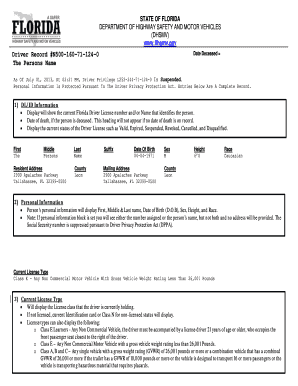
- Review the DL/ID Information section, which displays your current Florida Driver License number, name, date of death (if applicable), and the current status of your Driver License (e.g., Valid, Suspended). Ensure that all displayed details are correct.
- In the Personal Information section, confirm that your name, date of birth, sex, height, and race are accurate. Note that your Social Security number will be suppressed for privacy.
- Check the Current License Type section to verify the class of your license. Make sure it accurately reflects your driving privileges, such as Class E for non-commercial vehicles.
- In the Original and Prior State Information section, confirm the original issue dates for your license and CDL, as well as any prior state license information, if applicable.
- Review the License Type section for the most current status (e.g., Eligible, Suspended) along with its issue and expiration dates.
- Examine the Issuance History section to ensure that all previous licenses and permits are correctly listed, including issue dates.
- In the Exams section, review the history of your driving exams, including attempts and outcomes. Make sure all details are accurate.
- Check the Restrictions & Endorsements section for any applicable restrictions on your driving privileges or endorsements that you hold.
- Review the Special Driver Information section to confirm your eligibility for online renewal, organ donor status, and any other relevant information.
- In the Sanction Information section, review any actions taken against your driving privileges, noting the effective dates and requirements for reinstatement.
- Examine the Violations section for any traffic violations recorded against you. Ensure the dates and details are accurate.
- Lastly, check the Crashes and Driver Schools sections for any crashes or driver education courses that you have completed, ensuring all listed details are correct.
- Once all sections have been reviewed and necessary corrections made, you can save changes, download, print, or share the completed document.
Complete your FL DHSMV Driver Record online today for a seamless experience.
Under Florida law, motor vehicle, driver license and vehicular crash record information are public information.
Industry-leading security and compliance
US Legal Forms protects your data by complying with industry-specific security standards.
-
In businnes since 199725+ years providing professional legal documents.
-
Accredited businessGuarantees that a business meets BBB accreditation standards in the US and Canada.
-
Secured by BraintreeValidated Level 1 PCI DSS compliant payment gateway that accepts most major credit and debit card brands from across the globe.