Loading
Get Ca Plan Review Application - Diamond Springs 2017-2026
How it works
-

Open form follow the instructions
-

Easily sign the form with your finger
-

Send filled & signed form or save
How to fill out the CA Plan Review Application - Diamond Springs online
Filling out the CA Plan Review Application for Diamond Springs is a vital step in ensuring compliance with local fire safety regulations. This guide will provide you with clear, step-by-step instructions to help you complete the application accurately and efficiently online.
Follow the steps to successfully complete your application.
- Click ‘Get Form’ button to obtain the form and open it in the editor.
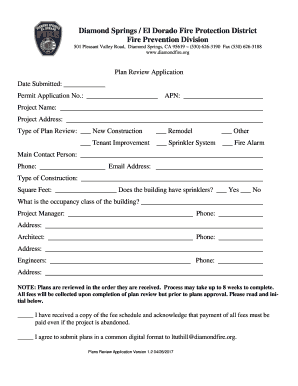
- Begin by entering the date submitted and permit application number in the specified fields at the top of the form. These are essential for tracking your application.
- Provide the Assessor's Parcel Number (APN) related to your project. This information helps identify the property in question.
- Fill in the project name and address. Ensure that the details are accurate to avoid delays in processing.
- Select the type of plan review from the options available: New Construction, Remodel, Other, Tenant Improvement, Sprinkler System, or Fire Alarm. Check the box next to the relevant category.
- Enter the main contact person's name, phone number, and email address. This individual will be the primary point of communication regarding the application.
- Specify the type of construction and the total square footage of the project. This data will assist in categorizing your application appropriately.
- Indicate whether the building has sprinklers by checking 'Yes' or 'No.' This is crucial in assessing fire safety measures.
- Provide the occupancy class of the building, which may require additional research depending on the specifics of your project.
- Fill out the project manager's contact information, including their phone number and address. Repeat this for the architect and engineers involved in the project.
- Read the note regarding the plan review process duration, which may take up to 8 weeks, and be sure to understand the fee requirements. Initial the acknowledgment section if you agree.
- Confirm your agreement to submit plans in a common digital format by initialing as required.
- Once all fields are completed, review the information to ensure accuracy. Save your changes, and then download, print, or share the completed form as necessary.
Get started on completing your CA Plan Review Application online today.