Loading
Get Canada Interior Health 821254 2014-2026
How it works
-

Open form follow the instructions
-

Easily sign the form with your finger
-

Send filled & signed form or save
How to fill out the Canada Interior Health 821254 online
Filling out the Canada Interior Health 821254 form online can seem daunting, but this guide will provide you with step-by-step instructions to assist you through the process. Whether you are a seasoned user or new to online forms, this comprehensive guide aims to make your experience straightforward and efficient.
Follow the steps to complete the online form correctly.
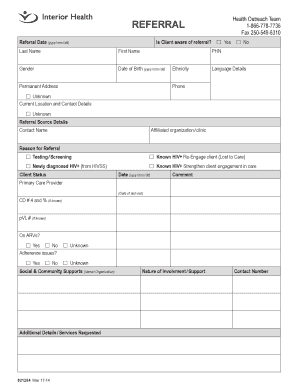
- Click the ‘Get Form’ button to access the referral form and open it in your document editor.
- Enter the referral date in the format yyyy/mm/dd. This is the date you are submitting the referral.
- Indicate whether the client is aware of the referral by selecting the appropriate checkbox: 'Yes' or 'No'.
- Fill out the client's last name and first name in the designated fields.
- Select the gender of the client from the options provided.
- Enter the client's date of birth in the format yyyy/mm/dd.
- Provide the client’s Personal Health Number (PHN) in the relevant section.
- Fill out the permanent address of the client accurately.
- Indicate the client's ethnicity and language details as necessary.
- Enter the client’s phone number. If unknown, select the appropriate checkbox.
- Provide the current location and contact details of the client, again marking unknown if applicable.
- In the referral source details section, add the contact name and the affiliated organization or clinic.
- Specify the reason for the referral by selecting the relevant checkboxes provided.
- Indicate the client's status with the related date and any comments in the respective fields.
- List the primary care provider and include the date of the last visit.
- If known, enter the CD # 4 percentage and the pVL number in the designated areas.
- Indicate whether the client is on ARVs by selecting 'Yes', 'No', or 'Unknown'.
- Report any adherence issues by checking 'Yes', 'No', or 'Unknown'.
- Document any social and community supports available for the client.
- Include any additional details or services requested in the relevant section.
- Once all fields are completed, save your changes, and consider downloading, printing, or sharing the form as needed.
Take the first step towards completing your referrals online today.
Care Lives Here We strive to live out our vision: Health and well-being for all, as we deliver hospital, community and long-term care services to the over 834,000 people across British Columbia's southern Interior region.