Loading
Get Nh Dhhs Rs-405263 2012-2026
How it works
-

Open form follow the instructions
-

Easily sign the form with your finger
-

Send filled & signed form or save
How to fill out the NH DHHS RS-405263 online
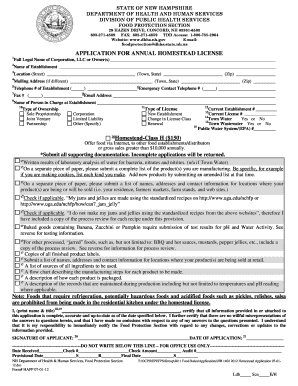
Completing the NH DHHS RS-405263 application for an annual homestead license can be straightforward when approached step-by-step. This guide will help you navigate each section of the form efficiently, ensuring that you provide all the necessary information to avoid delays in processing.
Follow the steps to fill out your application correctly.
- Press the ‘Get Form’ button to access the NH DHHS RS-405263 online, allowing you to fill out and edit the form easily.
- Enter the full legal name of the corporation, LLC, or owner(s) in the designated field. Ensure this is accurate to avoid issues with your application.
- Provide the complete name of the establishment as it will be registered. This should match any existing business registrations.
- Input the physical location of the establishment, including street number, street name, town, state, and zip code. This is crucial for identification and delivery of correspondence.
- If the mailing address is different from the establishment's location, fill out that section accordingly, including the town, state, and zip code.
- Provide the telephone number of the establishment, ensuring it is a valid and reachable number.
- Fill in the emergency contact telephone number. This should be a person who can be reached quickly in case of a crisis.
- Input the fax number of the establishment if applicable. This field can be left blank if fax communication is not used.
- Provide the email address of the establishment for electronic communication.
- Enter the name of the person in charge at the establishment. This may be the owner or a designated manager.
- Select the type of ownership by checking the appropriate option, such as sole proprietorship, corporation, or partnership. Include details if 'Other' is selected.
- Indicate the type of license you are applying for: new establishment, change in license class, or renewal.
- If known, input the current establishment number; otherwise, leave this field blank.
- Enter the current license number if applicable, or leave blank if this is not known.
- Circle 'Yes' or 'No' for town water and town wastewater, based on your establishment's services.
- Provide the public water system or EPA number if it is relevant and available.
- Select the applicable license class and ensure you submit all supporting documents as required.
- Print the name and title of the person completing the application, ensuring it matches legal documents.
- The applicant must sign the application at the indicated location, confirming that all information is accurate.
- Record the current date in the designated area before submitting the form.
- Review all entries for accuracy and completeness. Once satisfied, save the changes, download the completed form, print copies if necessary, and share it as required.
Complete your application online today to ensure a smooth processing experience.
New Hampshire Department of Health & Human Services (DHHS) Provides services for individuals, children, families and seniors, and administers programs and services such as mental health, developmental disability, substance abuse, and public health.