Loading
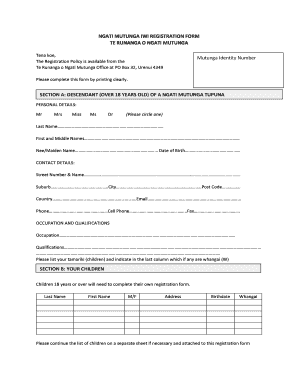
Get Nz Ngati Mutunga Iwi Registration Form 2013-2026
How it works
-

Open form follow the instructions
-

Easily sign the form with your finger
-

Send filled & signed form or save
How to fill out the NZ Ngati Mutunga Iwi Registration Form online
This guide provides a step-by-step approach to completing the NZ Ngati Mutunga Iwi Registration Form online. Users will gain a clear understanding of each section and field of the form, ensuring a smooth completion process.
Follow the steps to successfully complete the registration form.
- Click the ‘Get Form’ button to obtain the form and open it in the editor.
- In Section A, provide your personal details. Circle your title (Mr, Mrs, Miss, Ms, Dr), and then enter your last name, first and middle names, maiden name, and date of birth.
- Enter your contact details, including your street address, suburb, city, postcode, country, email, phone number, cell phone, and fax.
- Complete the occupation and qualifications section by entering your occupation and qualifications in the designated fields.
- List your children in Section B, indicating if any are whangai by checking the appropriate box. Note that children aged 18 years or over must complete their own registration form.
- In Section C, fill out the whakapapa connections. Provide the names of your grandparents, parents, and any other relevant whakapapa information, including your Ngati Mutunga tupuna if known.
- Read and understand the Privacy Act 1993 information in Section D, then complete the Authority & Declaration section by signing and dating the form.
- Once you have completed the form, you can save your changes, download a copy, print the form, or share it as needed.
Start filling out your registration form online today.
Don't forget, if you have any questions, you can contact Ngāti Mutunga by phone: (06) 752-3247 or email: office@ngatimutunga.iwi.nz.