Loading
Get Wv Dmv-98-trb 2019-2026
How it works
-

Open form follow the instructions
-

Easily sign the form with your finger
-

Send filled & signed form or save
How to fill out the WV DMV-98-TRB online
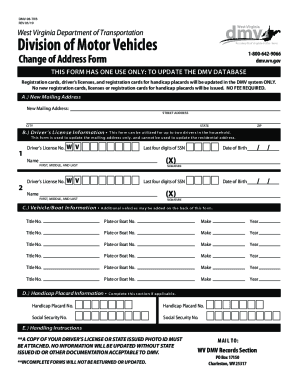
The WV DMV-98-TRB form is essential for individuals looking to update their mailing address on DMV records. This comprehensive guide provides clear instructions on how to effectively complete this form online.
Follow the steps to fill out the WV DMV-98-TRB form online.
- Click ‘Get Form’ button to obtain the form and open it in your preferred editing tool.
- Begin by providing your new mailing address in Section A. Enter your street address, city, state, and ZIP code.
- In Section B, fill out the driver’s license information. This section allows for up to two drivers in the household. For each driver, enter their driver’s license number, full name, last four digits of their Social Security number, and date of birth.
- Proceed to Section C to provide vehicle or boat information. You can list the title number, plate or boat number, make, and year for each vehicle. If you have additional vehicles, use the back of the form.
- If applicable, complete Section D for handicap placard information by entering the handicap placard number and Social Security number.
- Ensure that you attach a copy of your driver’s license or state-issued photo ID, as it is required for processing the change. Remember that incomplete forms will not be processed.
- Once all sections are filled out and reviewed for accuracy, you can save the document, download it, or print it for mailing.
Take action now to efficiently update your address by completing the WV DMV-98-TRB form online.