Loading
Get Canada Lab1192 2016-2026
How it works
-

Open form follow the instructions
-

Easily sign the form with your finger
-

Send filled & signed form or save
How to fill out the Canada LAB1192 online
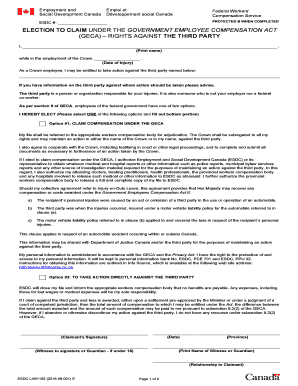
Filling out the Canada LAB1192 form is essential for individuals seeking to claim compensation under the Government Employees Compensation Act. This guide will provide you with clear and supportive instructions on how to complete the form accurately online.
Follow the steps to fill out the form correctly.
- Press the ‘Get Form’ button to access the LAB1192 form. This will allow you to open the document in your preferred online editor.
- In the first section, clearly print your full name where indicated. This ensures proper identification during the claims process.
- Next, indicate the date of the injury in the designated field. Be precise with this date as it is critical for the claims timeline.
- In the following section, supply information about the third party responsible for the injury, if applicable. This is someone who is not your employer or co-worker.
- Now, select one of the two options provided. If you choose Option #1, you will be claiming compensation under the GECA. Make sure to read and understand the implications of this choice.
- If you opt for Option #1, be sure to authorize Employment and Social Development Canada (ESDC) to access necessary medical reports and other relevant information as indicated in that section of the form.
- For Option #2, be aware that you will be taking direct action against the third party. This means you will not receive benefits from ESDC. Remember to consider the consequences of your choice carefully.
- After making your selection, date the form and provide your signature to finalize the application. This is essential for validating your submission.
- Lastly, provide the name of a witness or guardian, if applicable. Ensure that the witness signs in the designated area to complete the process.
- Once all sections are filled out and verified for accuracy, you can save any changes made, download the completed form, print a copy or share it as required.
Complete your Canada LAB1192 form online today to ensure your claim is processed efficiently.
Once you reach 3 years of Federal Service you are 100% vested in the agency automatic 1%. If you leave then you can walk away with your entire TSP, including your contributions, all of your agency matching and the automatic 1%.
Industry-leading security and compliance
US Legal Forms protects your data by complying with industry-specific security standards.
-
In businnes since 199725+ years providing professional legal documents.
-
Accredited businessGuarantees that a business meets BBB accreditation standards in the US and Canada.
-
Secured by BraintreeValidated Level 1 PCI DSS compliant payment gateway that accepts most major credit and debit card brands from across the globe.