Loading

Open form follow the instructions

Easily sign the form with your finger

Send filled & signed form or save
How to fill out the Pag Ibig Offer To Bid Form online
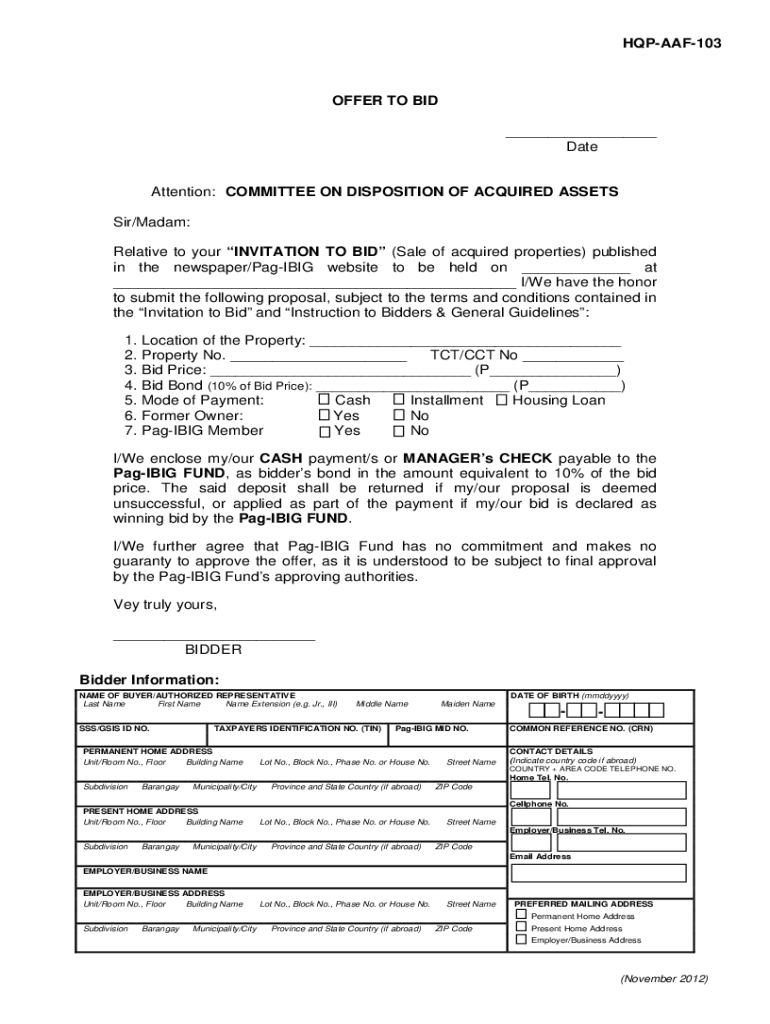
Filling out the Pag Ibig Offer To Bid Form online can be straightforward when you follow the right steps. This guide will walk you through each section of the form to ensure your submission is complete and accurate.
Follow the steps to fill out the Pag Ibig Offer To Bid Form
- Click the ‘Get Form’ button to obtain the form and open it in the editor.
- Begin by entering the date of your offer, ensuring it aligns with the auction schedule.
- Address the form to the Committee on Disposition of Acquired Assets, as indicated in the instructions.
- Provide the location of the property you are bidding for, including the property number and relevant TCT or CCT number.
- Clearly state your bid price, ensuring it complies with the minimum bid indicated.
- Calculate and enter the bid bond amount, which should be 10% of your bid price.
- Select your preferred mode of payment from the options provided (cash, installment, or housing loan).
- Indicate if you are the former owner of the property and if you are a Pag-Ibig member.
- Attach your cash payment or manager’s check as the bidder's bond to the form.
- Sign and date the form at the designated area.
- Provide your personal information as the bidder, including your name, contact details, and taxpayer identification number.
- Complete the authorization section if someone else is completing the form on your behalf.
- Review all the information entered for accuracy before finalizing your submission.
- Save your changes, download a copy for your records, and prepare to submit the form at the designated location on the auction day.
Prepare your Offer to Bid and participate in the auction by following these steps online.
Experience a faster way to fill out and sign forms on the web. Access the most extensive library of templates available.
Related content
Nov 22, 2025 — Paano Bumili Ng Pag-IBIG Foreclosed Properties 2025 | Step-by-Step Online...
Paano Bumili Ng Pag-IBIG Foreclosed Properties 2025 | Step-by-Step Online Bidding Guide!...
Get answers to your most pressing questions about US Legal Forms API.
How to bid in Pag-ibig?
To bid in Pag-ibig, you must first find the property you wish to bid on, and then fill out the Pag Ibig Offer To Bid Form with all necessary details. Submit your bid along with the required documents, and ensure you meet the bidding timeline. It's essential to review all conditions associated with the bid. Successful bidders will be notified and provided further steps to finalize their acquisition.
Who is eligible for Pag-ibig Fund?
Eligibility for the Pag-ibig Fund generally includes individuals working in the private sector, government employees, and self-employed persons. It's vital to meet the contribution requirements, which ensure you can interact with the Pag Ibig Offer To Bid Form effectively. Both local and overseas Filipino workers can also partake. Check the specific criteria to see how you can benefit from this program.
How to get approved by Pag-ibig?
To get approved by Pag-ibig, begin by submitting the necessary requirements, like valid identification and proof of income. You will also need to fill out the Pag Ibig Offer To Bid Form accurately. Once your documents are verified, Pag-ibig will assess your eligibility and financial capability. Ensure all your details are complete to streamline the approval process.
What are the 5 steps in the bidding process?
The bidding process typically involves five key steps: identifying the property, reviewing the Pag Ibig Offer To Bid Form, submitting your bid, waiting for results, and completing payment if your bid is accepted. Each step requires attention to detail and adherence to Pag-IBIG's guidelines to ensure compliance. Familiarity with these steps can significantly enhance your bidding experience.
What is bidding in Pag-ibig?
Bidding in Pag-IBIG refers to the process where members can offer bids on foreclosed properties or loans available through the organization. The Pag Ibig Offer To Bid Form is essential for submitting your bid and ensures your participation. This process allows members to obtain properties at competitive prices.
How to bid online auction?
Bidding in an online Pag-IBIG auction starts with creating an account on their platform. Once registered, locate the properties available for bidding and fill out the Pag Ibig Offer To Bid Form online. Make sure to submit your bid ahead of the auction's deadline.
How to prepare a bid document example?
Creating a bid document involves outlining your proposal clearly and concisely. Start by introducing your offer, followed by the bid amount and relevant terms. Use the Pag Ibig Offer To Bid Form as a template, ensuring all necessary elements are included to present a professional proposal.
How to fill out a bid form?
Filling out the Pag Ibig Offer To Bid Form requires you to provide your identification details and the specifics of your bid. Enter the property information and your offered amount comprehensively. Take your time to check everything before submission to prevent any errors.
How to fill out Pag-IBIG MDF form?
Filling out the Pag-IBIG MDF form involves providing your personal information, such as your name, address, and membership ID. Ensure that you complete all required sections accurately to avoid delays. The form is essential for membership and to access various Pag-IBIG services.
How to cancel bid in Pag-IBIG?
To cancel your bid in Pag-IBIG, you should contact their customer service or the designated office handling your bid. You'll need to provide your bid details along with reasons for cancellation. Make sure to act quickly, as cancellation policies tend to vary based on the bidding timeline.
Use professional pre-built templates to fill in and sign documents online faster. Get access to thousands of forms.
If you believe that this page should be taken down, please follow our DMCA take down process here.