Loading
Get Canada Beautycouncil Model Waiver Form 2020-2026
How it works
-

Open form follow the instructions
-

Easily sign the form with your finger
-

Send filled & signed form or save
How to fill out the Canada BeautyCouncil Model Waiver Form online
This guide provides step-by-step instructions for completing the Canada BeautyCouncil Model Waiver Form online. By following these detailed directions, you will be able to fill out the form accurately and efficiently to ensure a smooth process.
Follow the steps to complete the form correctly.
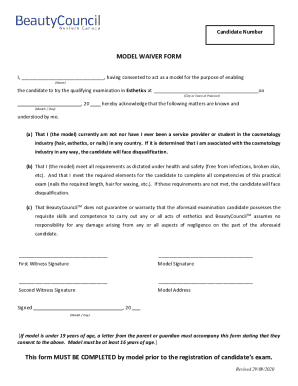
- Press the ‘Get Form’ button to access the Canada BeautyCouncil Model Waiver Form. This action will open the document in the editor for you to begin filling it out.
- In the first field, enter the name of the model, where it states 'I, _______________________________'. Ensure to input the full legal name clearly.
- Next, specify the city, town, or province where the examination will take place in the designated area. This information should reflect the location of the qualifying examination.
- Enter the date of the examination by filling in the month, day, and year as indicated. Ensure accuracy in the date format.
- Review the statements regarding your experience in the cosmetology industry. You must affirm that you are not a service provider or student in the field, as this will impact the candidate's qualification.
- Confirm that you meet health and safety requirements by ensuring you are free from infections or broken skin. This is necessary for the candidate to meet practical examination competencies.
- Acknowledge that BeautyCouncilTM does not guarantee the candidate's skills. This is a critical understanding for both the model and the candidate involved.
- Sign the form in the designated area for the model's signature to validate your consent. This signature confirms your acknowledgement of the form's statements.
- Two witness signatures are required. Ensure that both witnesses sign in the appropriate spaces provided on the form.
- Complete the model address section by providing a physical address where the model can be reached.
- Finally, make sure to date your signature at the bottom of the form, indicating the day the form was completed.
- If the model is under 19 years of age, remember that a letter of consent from a parent or guardian must be submitted along with this form.
Complete your form online now to ensure a timely registration for the candidate's examination.