Loading
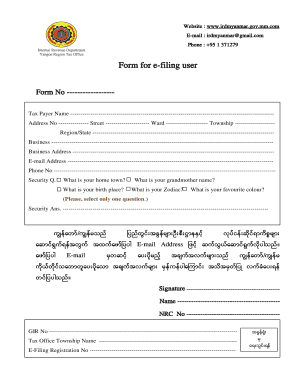
Get Htpps Mail Irdmyanmar Gov Mm 2020-2026
How it works
-

Open form follow the instructions
-

Easily sign the form with your finger
-

Send filled & signed form or save
How to fill out the Htpps Mail Irdmyanmar Gov Mm online
Filling out the Htpps Mail Irdmyanmar Gov Mm form online can seem overwhelming. This guide aims to simplify the process by providing clear and detailed instructions for each section of the form, ensuring that all users can complete it with confidence.
Follow the steps to successfully complete the form online.
- Click the ‘Get Form’ button to access the form and open it in the editor.
- Begin by entering your tax payer name in the designated field.
- Fill in your address number, street name, ward, township, and region/state in the appropriate fields.
- Provide details about your business, including its name and address.
- Enter your e-mail address and phone number to ensure you can be contacted.
- Answer the security questions by selecting one question to respond to. Examples include your hometown, birthplace, grandmother's name, zodiac sign, or favorite color.
- Fill in your security answer in the corresponding field.
- Complete the signature section by signing your name, and include your NRC number and GIR number.
- Enter the name of your tax office township.
- Finally, input your e-filing registration number if applicable.
- Once all fields are adequately filled, save changes, download, print, or share the form as needed.
Complete your documents online today for a smooth filing experience.
Related links form
To email the IRD in Hong Kong, you can visit their official site to find the designated email addresses for different tax-related inquiries. Make sure your message is clear and includes any relevant personal details to expedite the response. Note that responses may take some time, so be patient after sending your email. Remember, you can also find helpful resources and guidance on their website.