Loading
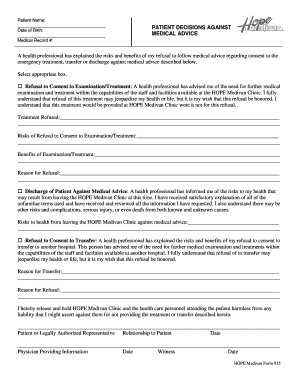
Get Hope Medivan Clinic Form 915
How it works
-

Open form follow the instructions
-

Easily sign the form with your finger
-

Send filled & signed form or save
How to fill out the Hope Medivan Clinic Form 915 online
Filling out the Hope Medivan Clinic Form 915 online can be a straightforward process when you have the right guidance. This guide provides detailed, step-by-step instructions to help you accurately complete each section of the form.
Follow the steps to complete the form efficiently.
- Click ‘Get Form’ button to access the form and open it in the available editor.
- Begin by entering the patient’s name clearly in the designated field. Ensure that the spelling is accurate to avoid any issues with records.
- Next, fill in the patient’s date of birth in the specified format. This information is crucial for proper identification and record keeping.
- Enter the medical record number if applicable. This number helps in tracking the patient’s medical history and treatments.
- Carefully read the section titled 'PATIENT DECISIONS AGAINST MEDICAL ADVICE.' This section outlines the patient's rights and the implications of refusing treatment.
- Choose the appropriate box to indicate whether you are refusing consent to examination/treatment, discharge against medical advice, or refusal to consent to transfer. Make sure to select only one option that applies.
- In the space provided, detail the treatment that is being refused. Be as specific as possible to ensure clear communication.
- Outline the risks associated with refusing the suggested examination or treatment. This section is critical in understanding the potential consequences of the decision.
- List the benefits of the proposed examination or treatment. This helps reflect on what may be gained by proceeding with the suggested course of action.
- State the reasons for the refusal succinctly. This explanation can aid healthcare providers in understanding the patient’s perspective.
- If applicable, use the relevant sections to document the refusal of discharge against medical advice or the refusal of transfer to another hospital. Include reasons and any relevant details.
- Finalize the form by having the patient or their legally authorized representative sign and date the document. Ensure the relationship to the patient is also indicated.
- Finally, record the name and date of the physician providing the information and a witness if required.
- Once all fields are completed, you can save changes, download, print, or share the form depending on your needs.
Begin completing the Hope Medivan Clinic Form 915 online today to ensure your health care preferences are documented.