Loading
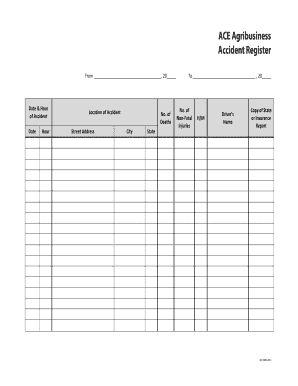
Get Ace Agribusiness Ace-1005 2013-2026
How it works
-

Open form follow the instructions
-

Easily sign the form with your finger
-

Send filled & signed form or save
How to fill out the ACE Agribusiness ACE-1005 online
The ACE Agribusiness ACE-1005 form is an essential document for recording accidents in agribusiness environments. This guide will provide you with clear, step-by-step instructions on how to accurately complete this form online.
Follow the steps to complete the ACE Agribusiness ACE-1005 efficiently.
- Click the ‘Get Form’ button to access the ACE Agribusiness ACE-1005 and open it in your preferred online editor.
- Enter the date and hour of the accident in the designated fields. Ensure you provide accurate information, as this is crucial for record-keeping.
- Fill in the location of the accident. Include the street address, city, and state to give a complete overview of where the incident occurred.
- Indicate the number of deaths if applicable. This field is critical for reporting serious incidents.
- Record the number of non-fatal injuries sustained during the accident. This information will help in assessing the incident's impact.
- Provide the driver's name in the appropriate section. This information is essential for identifying the parties involved in the accident.
- Attach a copy of the state or insurance report related to the accident. This documentation is vital for legal and insurance purposes.
- Review all the information you have entered for accuracy to prevent any potential issues. Once finalized, save your changes.
- After saving, you have the option to download the completed form, print it, or share it via your preferred method.
Complete your ACE Agribusiness ACE-1005 online today for efficient record management.