Loading
Get Canada Imm 5546 E 2016
How it works
-

Open form follow the instructions
-

Easily sign the form with your finger
-

Send filled & signed form or save
How to fill out the Canada IMM 5546 E online
This guide provides you with step-by-step instructions to help you complete the Canada IMM 5546 E form online. Whether you are familiar with digital forms or new to the process, this resource will ensure you fill out the form accurately and efficiently.
Follow the steps to accurately complete the Canada IMM 5546 E form.
- Click ‘Get Form’ button to access the form and open it in your preferred editing tool.
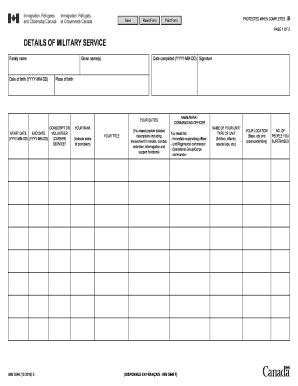
- Enter your family name in the designated field. Ensure the spelling is accurate as it will be used for official purposes.
- Input your given name(s) in the respective field. Use the same names as stated in your legal identification documents.
- Fill in the date you completed your military service using the YYYY-MM-DD format. This indicates when your service ended.
- Sign the form electronically or by hand as required, confirming the information provided is accurate.
- Indicate your place of birth. This should reflect your official documents.
- In the 'Your Duties' section, list your start and end dates of service, again in YYYY-MM-DD format. This section is crucial for outlining your military history.
- Specify whether your service was conscripted or voluntary by selecting the corresponding option.
- State your rank, including dates of promotion, which is important for your military record.
- Describe your title in the military and provide detailed descriptions of your duties, particularly any involvement in arrests, combat, detention, interrogation, and support functions.
- List the names and ranks of your commanding officer, including your immediate supervising officer, unit/regimental commander, and operational group/corps commander.
- Provide the name of your unit or type of unit, such as artillery, infantry, or special operations.
- Enter your location, specifying the base, city, and province/territory where you served.
- Indicate the number of people you supervised during your service. This information helps to illustrate your leadership experience.
- Once all sections are completed, you can save your changes, download, print, or share the completed form according to your needs.
Begin your online application by completing the Canada IMM 5546 E form today.
Get form
Experience a faster way to fill out and sign forms on the web. Access the most extensive library of templates available.
A score of 450 points in the Express Entry system can be competitive but may vary with different draw rounds. It's essential to stay updated on the latest cut-off scores as they can change depending on demand. Consider improving your score by enhancing your language skills or gaining more work experience.
Get This Form Now!
Use professional pre-built templates to fill in and sign documents online faster. Get access to thousands of forms.