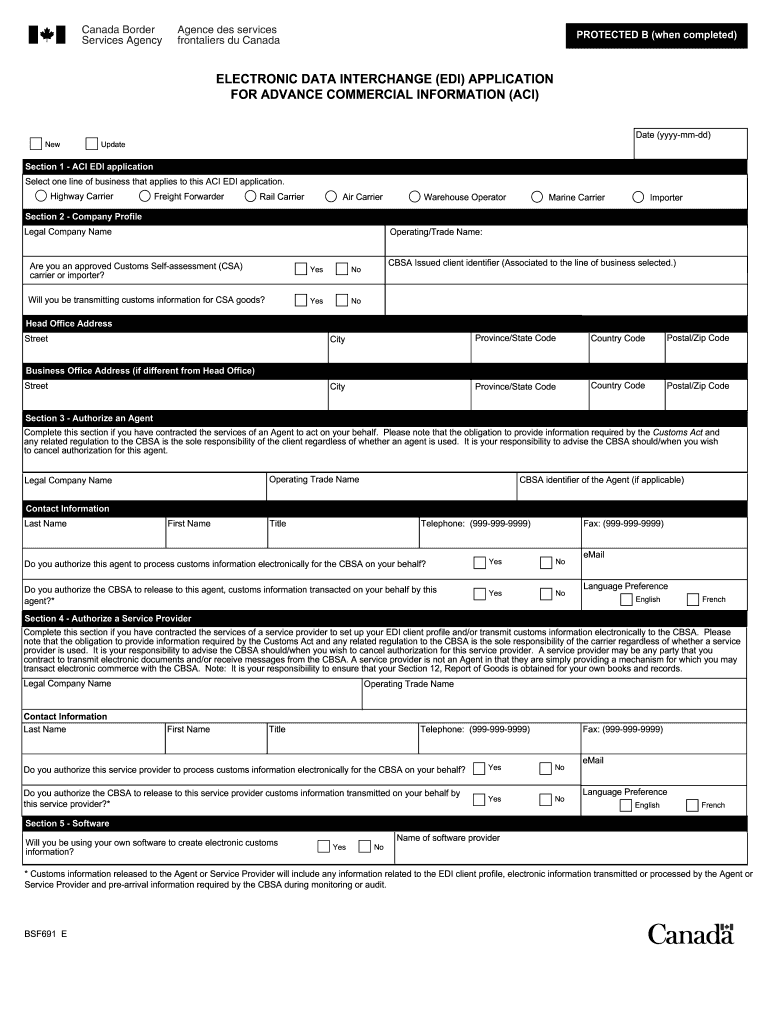
Ion related to the EDI client profile, electronic information transmitted or processed by the Agent or Service Provider and pre-arrival information required by the CBSA during monitoring or audit. BSF691 E Section 6 - Communications Proctocol Method Please identify the communication protocol method that you will be utilizing to transmit customs information electronically to the CBSA. More information on the approved communication methods may be found at www.cbsa-asfc.gc.ca/eservices/comm-eng.
Loading

Open form follow the instructions

Easily sign the form with your finger

Send filled & signed form or save
How to fill out the Canada BSF691 E online
Completing the Canada BSF691 E form online is a crucial step for businesses looking to apply for advance commercial information via electronic data interchange. This guide provides user-friendly, detailed instructions to ensure you successfully navigate the form's various sections.
Follow the steps to effectively complete the Canada BSF691 E form online.
- Click the ‘Get Form’ button to access the form and open it in your preferred editor.
- In Section 1, select either 'New' to submit a new application or 'Update' if you are making changes to an existing application. Enter the current date in the format yyyy-mm-dd.
- Still in Section 1, choose one line of business applicable to your application, such as 'Highway Carrier' or 'Air Carrier'. Remember, a separate application is needed for each business line.
- In Section 2, fill out your company profile. Include your legal company name, operating trade name (if different), and check if you are an approved Customs Self-assessment (CSA) carrier. Provide your CBSA issued client identifier, and fill out the head office address and additional business office address if applicable.
- If you are hiring an agent, complete Section 3. Provide the agent's legal and operating name, CBSA identifier, and contact information. Indicate whether you authorize the agent to process customs information and to release this information to them.
- If using a service provider, complete Section 4 with their details, similar to Section 3. Clarify their role in transmitting customs information and authorize accordingly.
- In Section 5, state whether you will use your own software for creating electronic customs information. If not, provide the name of your software provider.
- For Section 6, indicate the communication protocol method you will use for transmitting customs information. Follow the instructions to specify details such as certificate numbers and sender identification.
- In Section 7, select any voluntary notices you wish to receive from the CBSA, such as a completeness notice or manifest forward.
- Finally, complete Section 8 by providing the authorized person’s name, title, and contact details. Sign the form and enter the certification date.
- After reviewing the completed form for accuracy, save your changes, and you can proceed to download, print, or share the form as necessary.
Take the next step in managing your documentation by completing the Canada BSF691 E online today.
Experience a faster way to fill out and sign forms on the web. Access the most extensive library of templates available.
Related content
The North American Numbering Plan (NANP) is the basic format for ... Northern Mariana...
Get answers to your most pressing questions about US Legal Forms API.
How to apply to travel to Canada?
Applying to travel to Canada involves completing the necessary forms, including the Canada BSF691 E, depending on your travel purpose. You must also provide supporting documents like a valid passport and any other required identification. Ensure that you stay updated on current travel requirements to facilitate a smooth entry into Canada.
How to get fast card USA from Canada?
To obtain a FAST card for easier travel across the US-Canada border, you must apply through the Trusted Traveler Programs. This process includes background checks and interviews. Refer to the guidelines provided in Canada BSF691 E to ensure your application is complete and compliant for expedited processing.
Can a US citizen sponsor someone in Canada?
A US citizen cannot directly sponsor someone for residency in Canada. However, if the US citizen is a permanent resident or citizen of Canada, they can sponsor eligible family members. Following the rules in Canada BSF691 E is important to ensure compliance with all sponsorship requirements.
How to get sponsorship from Canada?
To get sponsorship from Canada, you must identify a qualifying sponsor who can submit your application under the guidelines provided by Canada BSF691 E. Your sponsor will need to demonstrate their ability to support you financially and meet other criteria outlined by the Canadian immigration system. It is crucial to have thorough documentation ready to streamline this process.
How can I get a sponsor from Canada?
To secure a sponsor from Canada, you should first reach out to family members or friends who meet the sponsorship criteria. Communicating your circumstances and intentions transparently can help in gaining their support. Utilizing resources like Canada BSF691 E provides guidelines that clarify necessary steps and documentation required for sponsorship.
Where can I get a Canadian declaration form?
You can obtain a Canadian declaration form directly from the official immigration website of the Government of Canada. Alternatively, various legal platforms offer downloadable versions of this form, making it easier for you to start your application. Always ensure that you are using the correct version of Canada BSF691 E to avoid delays.
Who can sponsor me from Canada?
In Canada, family members such as spouses, common-law partners, or dependent children can sponsor you for residency. Additionally, other relatives including parents or grandparents may become sponsors under certain conditions. It's essential to understand the eligibility requirements outlined in Canada BSF691 E to ensure a smooth sponsorship process.
How to fill out a w8ben form in Canada?
Filling out a W-8BEN form in Canada is necessary if you are a non-US person receiving income from US sources. This form is used to establish your foreign status and claim any applicable tax treaty benefits. For detailed instructions on completing the W-8BEN while filing your Canada BSF691 E, consider using online guides or professional assistance.
How do I report international income?
Reporting international income involves including all foreign earnings on your Canadian tax return. Use the Canada BSF691 E form to help clearly indicate your foreign income sources. Properly reporting international income is essential to maximize your tax benefits and comply with the Canadian tax system.
How do I submit a tax form in Canada?
To submit a tax form in Canada, you can file your return online through the CRA's portal, by mail, or using tax software. Ensure you complete the Canada BSF691 E and any other necessary forms accurately to avoid delays. Online submissions often result in faster processing times and quicker refunds.
Use professional pre-built templates to fill in and sign documents online faster. Get access to thousands of forms.
If you believe that this page should be taken down, please follow our DMCA take down process here.