Loading
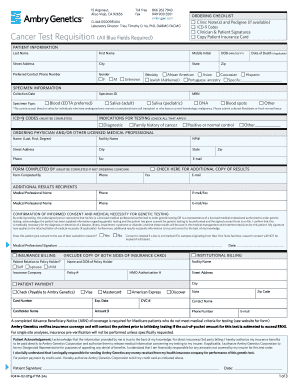
Get F0414-02-011g-ptm-34a
How it works
-

Open form follow the instructions
-

Easily sign the form with your finger
-

Send filled & signed form or save
How to fill out the F0414-02-011g-PTM-34a online
Filling out the F0414-02-011g-PTM-34a form online is a straightforward process that ensures accurate submission of essential medical information. This guide will provide you with step-by-step instructions to help navigate each section of the form effectively.
Follow the steps to fill out the form accurately.
- Press the ‘Get Form’ button to download the F0414-02-011g-PTM-34a form and open it in your preferred editor.
- Begin by entering the patient's information in the designated fields. Ensure you fill out the last name, first name, middle initial, date of birth, street address, city, state, zip code, preferred contact phone number, gender, and date of death if applicable.
- For the ethnicity section, tick the appropriate box for the patient's ethnicity. If the specified categories do not apply, provide the necessary details in the specified text field.
- Fill out the specimen information, including the collection date and specimen type. Choose from options like blood, saliva, or DNA, and provide the respective specimen ID.
- In the ICD-9 codes section, ensure that you enter all required codes that correspond to the patient's diagnosis or medical conditions.
- Move to the ordering physician section. Provide the name, facility name, NPI number, address, contact number, and email of the physician ordering the test.
- Complete the form if you are not the ordering clinician by filling out the 'form completed by' section with your name and contact information.
- In the confirmation of informed consent section, review the statements and provide your signature along with the date. Indicate whether the patient consents to the use of their sample for research.
- Fill out the insurance billing details. Include the relationship to the policyholder, insurance company, policy number, and attach copies of the insurance card where required.
- Complete the patient payment section if applicable, including information such as payment method and card details.
- Once all sections are filled out accurately, review the information for accuracy, save your changes, and proceed to download, print, or share the completed form as needed.
Start completing your documents online today for a swift and efficient process.