Loading
Get Ny Es 161.5 2016
How it works
-

Open form follow the instructions
-

Easily sign the form with your finger
-

Send filled & signed form or save
How to fill out the NY ES 161.5 online
Filling out the NY ES 161.5 form online is an essential step for individuals seeking to withdraw from the Self-Employment Assistance Program. This guide provides clear and supportive instructions to help users complete the form accurately and efficiently.
Follow the steps to successfully complete the NY ES 161.5 form online.
- Press the ‘Get Form’ button to access the form and open it in your browser.
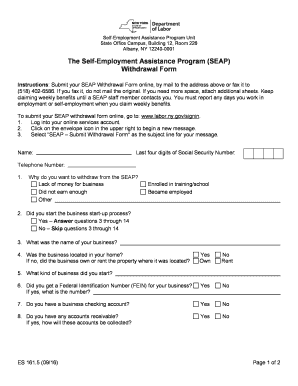
- Begin by entering your personal details, including your full name, the last four digits of your Social Security Number, and your telephone number.
- Indicate your reason for withdrawing from the SEAP by selecting one of the options provided: lack of money for business, did not earn enough, enrolled in training/school, or became employed.
- Answer whether you started the business start-up process. If yes, proceed to complete questions 3 through 14; if no, skip to the next relevant section.
- Provide the name of your business and mention if it was located in your home. If not located in your home, indicate whether you owned or rented the property.
- State whether you received a Federal Identification Number (FEIN) for your business and provide the number if applicable.
- Answer if you have a business checking account and provide your response.
- Indicate if you have any accounts receivable and explain how they will be collected.
- State if you have any inventory and outline your plans for that inventory.
- Provide information about any outstanding business debts, if applicable.
- Indicate if you have any other business obligations and explain them.
- Answer whether you purchased any equipment for your business and detail your plans for that equipment.
- State if you promoted your business and explain how you did so.
- Indicate if you are still performing any activity for your business. If no, provide the date you stopped. If yes, please provide an explanation.
- Utilize the space provided for any additional comments regarding the SEAP program.
- Certify that the information you provided is true and correct, sign the form, and include the date.
- Once you have completed the form, you may save your changes, download, print, or share the document as needed.
Complete your NY ES 161.5 form online today and ensure your withdrawal process is smooth and efficient.
Get form
Experience a faster way to fill out and sign forms on the web. Access the most extensive library of templates available.
Get This Form Now!
Use professional pre-built templates to fill in and sign documents online faster. Get access to thousands of forms.