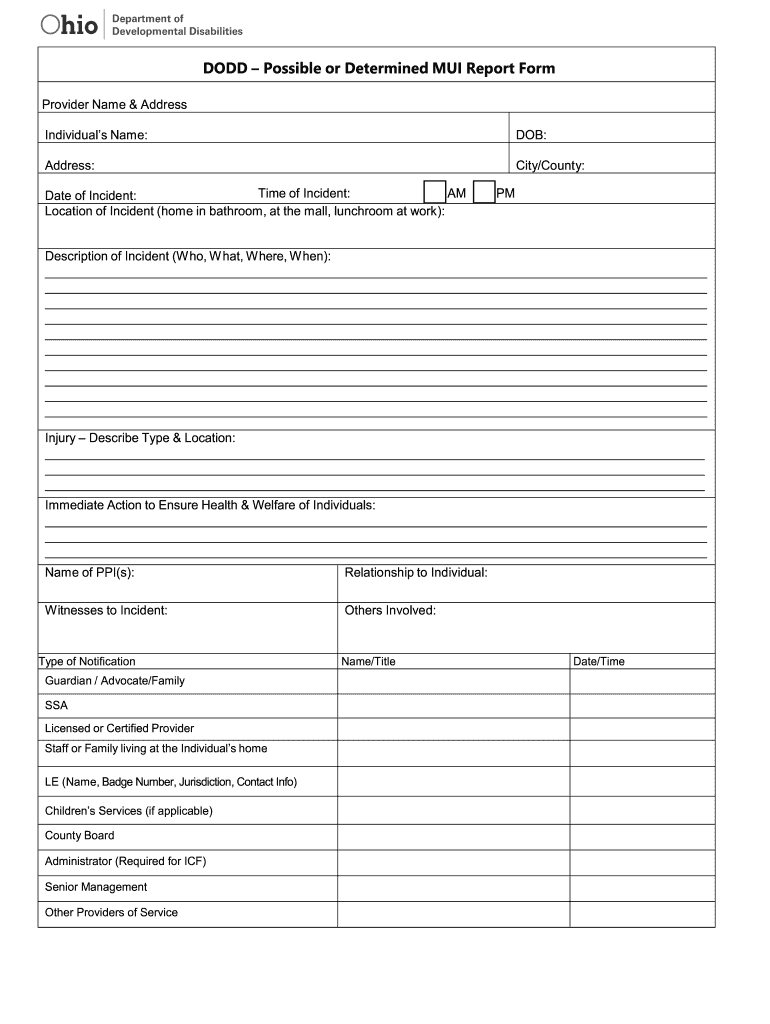
DODD Possible or Determined MUI Report Form Provider Name & Address Individuals Name:DOB:Address:City/County:Time of Incident: AM Date of Incident: Location of Incident (home in bathroom, at the.

Open form follow the instructions

Easily sign the form with your finger

Send filled & signed form or save
How to use or fill out the OH DODD – Possible Or Determined MUI Report Form online
Filling out the OH DODD – Possible Or Determined MUI Report Form online requires careful attention to detail to ensure all necessary information is accurately provided. This guide will assist you through each component of the form, making the process clear and straightforward.
Follow the steps to complete the form accurately:
- To begin, press the ‘Get Form’ button to acquire the form and open it in the editing interface.
- Enter the provider's name and address at the start of the form. This information identifies who is reporting the incident.
- Provide the individual's name along with their date of birth and address. This ensures the report is linked to the correct person.
- Fill in the city or county where the individual resides. Next, indicate the time and date of the incident, specifying whether it occurred in the AM or PM.
- Describe the location of the incident succinctly, including details such as 'home in bathroom' or 'at the mall.'
- In the 'Description of Incident' section, provide a clear account of what happened, including who was involved, what occurred, where it took place, and when it happened.
- Detail any injuries sustained in the 'Injury – Describe Type & Location' field, including the types of injuries and specific locations on the body.
- Document immediate actions taken to ensure the health and welfare of the individuals involved in the incident.
- List the name of the person(s) involved (PPI), their relationship to the individual, and any witnesses to the incident.
- In the 'Type of Notification' section, select all relevant parties that were informed about the incident, such as guardians, service providers, or law enforcement.
- Provide the name/title of the person filling out the report along with the date and time of the report's completion.
- Include any additional information or administrative follow-up required, detailing further medical actions and administrative actions taken.
- Specify which body parts were injured, and check all relevant areas on the provided checklist.
- Describe causes and contributing factors to the incident thoroughly.
- Lastly, if applicable, note preventive measures for internal use by the provider.
- Complete the administrator review section with the administrator's name and date for final verification.
- Once all sections are filled, save your changes. You can download, print, or share the form as needed.
Start filling out your OH DODD – Possible Or Determined MUI Report Form online today for efficient documentation.
Experience a faster way to fill out and sign forms on the web. Access the most extensive library of templates available.
Related content
Aug 22, 2019 — Use this form to report and track usual or major unusual incidents. An...
(1) CBDD shall make available all records including but not limited to work papers...
Here are all the best courses updated and ranked daily to help you find a course for your...
Get answers to your most pressing questions about US Legal Forms API.
What is a mui report?
Major unusual incidents, also called MUIs, are alleged, suspected, or actual occurrences of an incident when there is reason to believe the health and welfare of a person may be adversely affected or the person is placed at a likely risk of harm. MUIs are reported so they can be investigated.
What are the categories of mui?
Types of Major Unusual Incidents Accidental or Suspicious Death. The death of a person resulting from an accident or suspicious circumstances. ... Attempted Suicide. ... Death Other than Accidental or Suspicious Death. ... Exploitation. ... Failure to Report. ... Law Enforcement. ... Medical Emergency. ... Misappropriation.
Which mui types are required to be reported within four hours?
Notification to the County Board about the below listed incidents within 4 hours of discovery: Accidental or suspicious death; Exploitation; Misappropriation; Neglect; Peer-to-peer act; Physical abuse; Prohibited sexual relations; Sexual abuse; Page 2 Verbal abuse; and When the provider has received an inquiry from the ...
Do all reports of an mui require an investigation?
UIs and MUIs each have required reporting periods and reporting methods. All incidents have to be investigated but some require police and other agencies to be involved.
What does unfounded is a possible outcome of an MUI investigation mean?
“Unfounded” means the evidence supports a finding that the alleged incident did not or could not have occurred (per OAC 5123:2-17-02).
How often should providers submit an MUI analysis to the County Board of DD?
Every Agency Provider must submit to the County Board an annual analysis of MUIs occurring during the preceding calendar year.
What does Mui mean in disability?
Major unusual incidents, also called MUIs, are alleged, suspected, or actual occurrences of an incident when there is reason to believe the health and welfare of a person may be adversely affected or the person is placed at a likely risk of harm.
Use professional pre-built templates to fill in and sign documents online faster. Get access to thousands of forms.
If you believe that this page should be taken down, please follow our DMCA take down process here.