Loading
Open form follow the instructions
Easily sign the form with your finger
Send filled & signed form or save
How to fill out the Coding Audit Template online
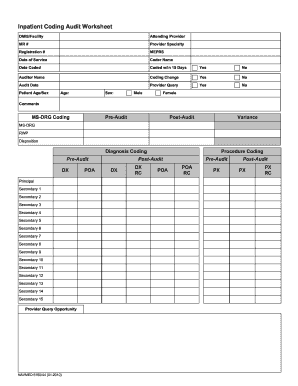
The Coding Audit Template is a crucial document for ensuring accurate coding in inpatient care. This guide provides step-by-step instructions to help you effectively complete the template online, ensuring all necessary fields are accurately filled.
Follow the steps to complete the Coding Audit Template online.
- Click the ‘Get Form’ button to access the Coding Audit Template and open it in your preferred online editor.
- Begin filling out the 'DMIS/Facility' section by entering the relevant facility information.
- In the 'Attending Provider' field, input the name of the attending medical provider.
- Enter the 'MR #' (Medical Record Number) associated with the patient in question.
- Provide the 'Registration #' for the patient, which is often found in hospital records.
- Fill in the 'MEPRS' (Medical Expense and Performance Reporting System) code relevant to the case.
- Record the 'Date of Service' when the patient was treated.
- Enter the name of the coder responsible for coding the services in the 'Coder Name' field.
- Indicate the 'Date Coded' when the coding was completed.
- Mark 'Coded w/in 15 Days' with 'Yes' or 'No' to indicate if the coding was completed within the required time frame.
- Provide the name of the auditor in the 'Auditor Name' section.
- For 'Coding Change', select 'Yes' or 'No' to indicate if any coding changes have been made.
- In the 'Audit Date' field, enter the date when the audit was conducted.
- Answer 'Provider Query' with 'Yes' or 'No' based on whether queries were raised during the coding process.
- Fill out 'Patient Age/Sex', providing the patient's age and selecting Male or Female.
- Use the 'Comments' section to add any additional notes or observations relevant to the coding.
- Proceed to 'MS-DRG Coding' and fill in the necessary pre-audit and post-audit details.
- In the 'Diagnosis Coding' section, input the relevant diagnosis codes, specifying principal and secondary diagnoses.
- Address any opportunities for provider queries if necessary.
- Complete the 'Procedure Coding' section by providing both pre-audit and post-audit information for each procedure.
- Review all entries for accuracy and ensure every field is filled out properly.
- Once all information is entered, you can save the changes, download, print, or share the completed form.
Complete your Coding Audit Template online today to ensure accurate and efficient coding!
Experience a faster way to fill out and sign forms on the web. Access the most extensive library of templates available.
Related content
Past, Family, & Social History (PFSH):. ☐ None ☐ Pertinent (1 of any) ☐ Complete...
E&M AUDIT FORM. Patient Name. MR#. DOS. Provider. Insurance. Dept. Type of Service...
by J Vanegue · Cited by 37 — Extended static checking tools (such as ESC/Java [1]...
Get answers to your most pressing questions about US Legal Forms API.
What is an example of skills in auditing?
Skills in auditing may include analytical thinking, attention to detail, and strong communication abilities. Proficient use of tools, like the Coding Audit Template, can greatly enhance your auditing skills. Additionally, understanding relevant regulations and compliance requirements is crucial for effective audits. Being adept in these areas allows you to deliver more thorough and insightful audits.
How to make an audit plan template?
Creating an audit plan template starts with outlining the objectives and scope of your audit. The Coding Audit Template is an effective tool that can guide you through various aspects such as timelines, resources needed, and team responsibilities. Ensure each section is clear and actionable, allowing for seamless execution during the audit. Regular updates to the template can enhance its effectiveness.
How to analyse a skills audit?
Analyzing a skills audit involves reviewing the collected data to identify strengths and gaps within your team. Utilize the Coding Audit Template to categorize and visualize the findings. Look for patterns that indicate common areas for improvement, and consider developing training programs based on this analysis. Regularly revisiting the audit can help track progress over time.
How to fill in a skills audit?
To fill in a skills audit, begin by defining the competencies relevant to the roles being assessed. Use the Coding Audit Template to organize your data efficiently. Each team member should evaluate their own skills, but consider including feedback from supervisors for a more comprehensive view. This collaborative approach enhances accuracy and drives personal development.
How to perform a coding audit?
Performing a coding audit begins with selecting the right Coding Audit Template that fits your specific needs. Next, review the code systematically, focusing on areas such as performance, security, and compliance. Document any issues or recommendations as you proceed. Lastly, present your findings in a clear report, making it easy for your team to understand the necessary improvements.
How to fill out a skills audit?
Filling out a skills audit involves assessing each individual's capabilities against defined competencies. Utilize the Coding Audit Template to create a structured format that helps you map out skills efficiently. Ensure that each skill is clearly outlined, along with a rating or level of proficiency for easy analysis. After completion, have the audit reviewed by relevant stakeholders.
How do I fill out an audit report?
To fill out an audit report, start by gathering all necessary data regarding the project or process you are evaluating. Use the Coding Audit Template as a guide to ensure you cover all crucial sections, like objectives, findings, and recommendations. Clearly document your observations in a concise manner. Make sure to review the report thoroughly before finalizing it.
What is an audit plan template?
An audit plan template is a structured document that outlines an auditor's approach to conducting an audit. It typically includes objectives, scope, resources, and methodologies. Using a Coding Audit Template can enhance your audit plan by ensuring you cover all necessary aspects of code evaluation.
How to create an audit report template?
Creating an audit report template involves outlining the key findings, conclusions, and recommendations from the audit. Include sections for executive summaries and detailed analyses. Utilizing a Coding Audit Template can be beneficial, as it provides a standard format for documenting code-specific findings.
How to develop a coding audit plan?
To develop a coding audit plan, begin by identifying the standards and guidelines relevant to your codebase. Establish the audit's objectives, and use a Coding Audit Template to define the scope and criteria. This structured approach will facilitate a clear and focused audit process.
Use professional pre-built templates to fill in and sign documents online faster. Get access to thousands of forms.
If you believe that this page should be taken down, please follow our DMCA take down process here.