Loading
Get Mo Sgcmh Physician Clinics Hipaa Privacy Rule 2015-2026
How it works
-

Open form follow the instructions
-

Easily sign the form with your finger
-

Send filled & signed form or save
How to fill out the MO SGCMH Physician Clinics HIPAA Privacy Rule online
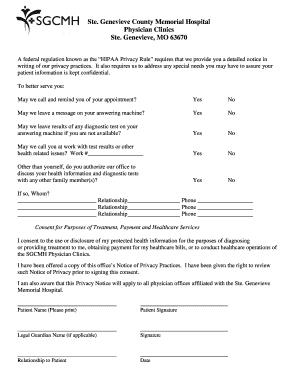
Filling out the MO SGCMH Physician Clinics HIPAA Privacy Rule form is an important process that helps ensure your privacy rights are respected. This guide provides a clear, step-by-step approach to assist you in completing this form online with confidence.
Follow the steps to complete the MO SGCMH Physician Clinics HIPAA Privacy Rule form online.
- Press the ‘Get Form’ button to access the document and open it in the online editor.
- Begin by reviewing the introductory information regarding your privacy rights under the HIPAA Privacy Rule stated at the top of the form.
- Indicate whether you would like to receive appointment reminders by checking 'Yes' or 'No' for the respective questions.
- Provide your work phone number, if you choose to allow the clinic to contact you at work regarding test results or health-related issues.
- Specify any family members whom you authorize the office to discuss your health information, filling in their names, relationships to you, and contact numbers.
- Read the consent statement regarding the use or disclosure of your protected health information. Ensure you understand its implications.
- Print your name clearly in the designated space for 'Patient Name'.
- Sign the form in the 'Patient Signature' area to indicate your consent.
- If applicable, print and sign your legal guardian's name in the designated section, and specify their relationship to you.
- Finally, enter today's date in the specified area before completing the process.
Complete your MO SGCMH Physician Clinics HIPAA Privacy Rule form online today to ensure your privacy preferences are addressed.