Loading
Get Uk Nenthorn Equestrian Centre Rider Registration Form 2014-2026
How it works
-

Open form follow the instructions
-

Easily sign the form with your finger
-

Send filled & signed form or save
How to fill out the UK Nenthorn Equestrian Centre Rider Registration Form online
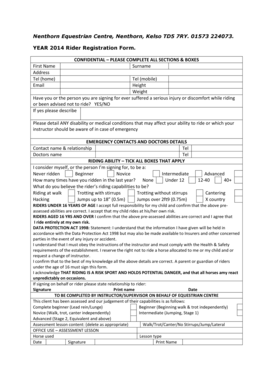
Filling out the UK Nenthorn Equestrian Centre Rider Registration Form online is an essential step for ensuring a smooth registration process for riders. This guide will provide you with clear and comprehensive steps to complete the form accurately.
Follow the steps to successfully complete your rider registration form.
- Click ‘Get Form’ button to obtain the form and open it in the appropriate editor.
- Begin by entering your first name and surname in the designated fields. Make sure to double-check the spelling for accuracy.
- Fill in your address along with your home and mobile telephone numbers.
- Provide your email address to ensure the centre can contact you easily regarding your registration.
- Indicate your height and weight in the respective fields. This information is useful for matching you with the appropriate horse.
- Answer the question regarding any serious injuries or discomfort experienced while riding by selecting 'Yes' or 'No'. If ‘Yes’, provide a brief description.
- Disclose any disability or medical conditions that may affect your riding or could be relevant in an emergency situation.
- Fill out emergency contact details, including the contact person's name, relationship to you, and their telephone number. Additionally, provide your doctor's name and telephone number.
- In the riding ability section, tick all boxes that apply to you or the rider you are signing for, specifying past riding experiences and capabilities.
- If you are registering a rider under 16 years of age, confirm your responsibility for the child's riding abilities. For riders aged 16 and over, confirm awareness of the risks involved.
- Acknowledge the Data Protection Act by reading and understanding how your information will be used. Confirm adherence to the instructions and safety requirements set by the centre.
- Sign the form, print your name, and date it. Ensure a parent or guardian signs if the rider is under 16.
- Once all sections are filled out completely, you can save changes, download the form, print it for your records, or share it as needed.
Please ensure all information is accurate and complete before submitting your rider registration form online.