Loading
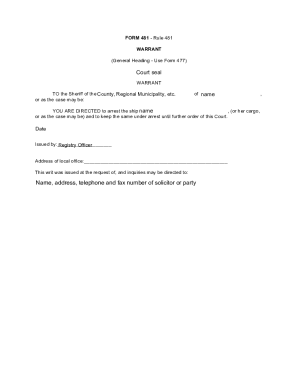
Get Canada Form 481 2016-2026
How it works
-

Open form follow the instructions
-

Easily sign the form with your finger
-

Send filled & signed form or save
How to fill out the Canada Form 481 online
Filling out Canada Form 481 online is an essential step in the legal process of obtaining a warrant. This guide provides clear and supportive instructions tailored to users of all experience levels, ensuring a smooth online completion of the form.
Follow the steps to successfully fill out Canada Form 481 online.
- Click ‘Get Form’ button to obtain the form and open it for editing.
- Enter the name of the county in which the warrant is being issued. This should be the jurisdiction relevant to your case.
- Fill in the ship's name that is to be arrested, ensuring accuracy to avoid confusion.
- If applicable, specify details about the cargo under arrest, including any pertinent information.
- Record the date when the form is completed to ensure that the issuance is timely.
- Sign the form in the designated area, ensuring that the signature is that of the issuing registry officer.
- Provide the address of the local office where the form is being processed.
- Include the contact details of the solicitor or party requesting the warrant, including their name, address, telephone, and fax number.
- Review the completed form for accuracy and completeness before proceeding.
- Once complete, save your changes, and utilize the options to download, print, or share the form as needed.
Begin filling out your documents online today for a streamlined legal process.