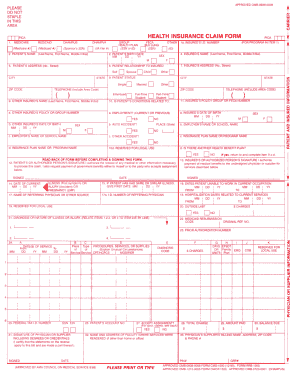
APPROVED OMB-0938-0008 ... RCA HEALTH INSURANCE CLAIM FORM RCA. 1. .... APPROVED MB-0938-0008 FORM CMS-1500 12-90 , FORM RRB-1500.
Open form follow the instructions
Easily sign the form with your finger
Send filled & signed form or save
How to fill out the CMS-1500 online
Filling out the CMS-1500 form online can streamline your medical billing process. This guide will provide you with essential information and step-by-step instructions to ensure accuracy and efficiency.
Follow the steps to effectively complete the CMS-1500 form.
- Click ‘Get Form’ button to obtain the form and open it in the editor.
- Begin by entering the patient’s identification information in the required fields. This includes their name, address, date of birth, and insurance details.
- Complete the provider's information, which may consist of the name, address, and details of the medical practice or healthcare provider.
- Fill in the relevant information pertaining to the insurance coverage using the correct policy numbers and identifying information.
- Detail the services provided to the patient, including dates of service, procedure codes, and the associated charges for each service.
- Review the completed sections to ensure all information is accurate and complete, then save your changes.
- Once finalized, download, print, or share the form as needed for submission.
Start filling out your CMS-1500 form online today for a more efficient billing process.
Experience a faster way to fill out and sign forms on the web. Access the most extensive library of templates available.
Related content
A federal government website managed and paid for by the U.S. Centers for Medicare &...
PATIENT'S OR AUTHORIZED PERSON'S SIGNATURE I authorize the release of any medical or other...
by JB Doe — The revised 1500 Claim Form expands the length of some existing fields...
Get answers to your most pressing questions about US Legal Forms API.
Who fills out a CMS-1500 form?
Typically, healthcare providers or their administrative staff fill out the CMS-1500 form. This includes physicians, chiropractors, and other qualified practitioners who seek reimbursement for services rendered. Using platforms like US Legal Forms can streamline the process, ensuring that all required information is accurately captured. This supports efficient and timely payment from insurers.
What is the correct format for birthdate entry on the CMS-1500 claim?
When entering a birthdate on the CMS-1500 claim form, use the MM/DD/YYYY format. This standard format aids in minimizing errors and ensures that all information is clear to processing agents. By following this guideline, you can enhance the accuracy of your submissions. Check your entries carefully to avoid complications.
What is the proper format for entering a date on a CMS-1500?
To properly enter a date on a CMS-1500, follow the MM/DD/YYYY format strictly. This format helps insurers process claims efficiently. Any deviation may lead to claim rejection or delays. Thus, accuracy when writing dates ensures better communication with insurance providers.
What is the proper format for writing the date?
When writing a date on the CMS-1500 claim form, the correct format is MM/DD/YYYY. This ensures clarity and aligns with standardized practices. Using this format minimizes confusion and helps facilitate a smoother claims process. Consistency in date format is critical for timely reimbursement.
What is the Medicare date format?
The Medicare date format typically follows a month/day/year structure. For instance, dates should be written as MM/DD/YYYY. It is essential to use this format on the CMS-1500 claim form to prevent processing errors with Medicare. Always double-check your entries to ensure they meet Medicare's requirements.
What are the most common errors made when filling out a CMS-1500 claim form?
One of the most common errors when completing a CMS-1500 claim form includes incorrect patient identification information. Also, missing or incorrect insurance information can lead to delays in processing claims. Another frequent mistake is not adequately documenting the services provided. To avoid these issues, consider using a reliable platform like US Legal Forms to ensure accurate completion.
Who fills out a CMS 1500 form?
1500 form is filled out by healthcare providers, billing personnel, or office managers. It is important for the individual completing the form to gather all necessary patient and service information beforehand. Ensuring accuracy and completeness is critical to avoid delays in claim processing. You can rely on resources from uslegalforms to assist in correctly filling out the CMS1500.
Can I print my own CMS 1500?
Yes, you can print your own CMS-1500 forms for submission. Many providers prefer printing the blank forms from reputable sources to ensure compliance with regulations. This method allows for personalization and accuracy, as you can double-check all entries before submission. Our platform offers printable versions and user-friendly instructions for convenience.
Who completes the CMS 1500 claim form?
The CMS-1500 claim form is typically completed by authorized billing staff or healthcare providers. It is crucial for the person completing the form to have a clear understanding of the services provided and the billing process. Accuracy in this step ensures timely payment for services rendered. Consider using uslegalforms for resources that can aid in this process.
Which types of providers use CMS 1500 claim forms?
CMS-1500 claim forms are used by a variety of providers, including individual practitioners, group practices, and specialized clinics. These forms are particularly relevant for outpatient services and non-institutional healthcare providers. Knowing which types of providers require this form helps in managing claims efficiently. With uslegalforms, you can access templates and tips for effective submissions.
Use professional pre-built templates to fill in and sign documents online faster. Get access to thousands of forms.
If you believe that this page should be taken down, please follow our DMCA take down process here.
This form is available in several versions. Select the version you need from the drop-down list below.