Loading
Get De Cegat Order Form Blood Disorders 2020-2026
How it works
-

Open form follow the instructions
-

Easily sign the form with your finger
-

Send filled & signed form or save
How to fill out the DE CeGat Order Form Blood Disorders online
Completing the DE CeGat Order Form for Blood Disorders online can seem challenging, but this guide will walk you through each section, ensuring you provide all necessary information clearly and accurately. Follow these steps to streamline your submission process.
Follow the steps to fill out the order form accurately.
- Press the ‘Get Form’ button to access the DE CeGat Order Form for Blood Disorders and open it in your preferred editor.
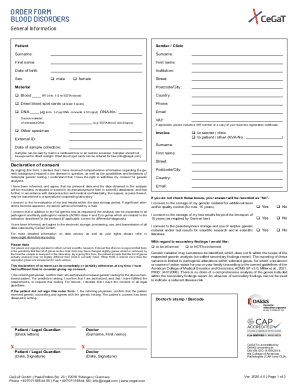
- Begin by filling out the 'General Information' section with patient details: enter the patient's surname, first name, date of birth, and sex. Make sure to select either 'male' or 'female' as appropriate.
- In the 'Sender / Clinic' section, provide the sender's or clinic's name and address. This includes the surname, first name, street address, postcode/city, and country.
- Indicate the material required for testing. You can choose from blood, dried blood spot cards, or DNA by marking the appropriate checkbox and specifying quantities where necessary.
- Proceed to provide the 'Invoice' details. Specify whether the invoice should be sent to the sender/clinic or the patient, and include any External ID if applicable.
- Complete the 'Declaration of consent' section. Carefully read the consent statements, ensuring you understand your rights regarding genetic testing, data storage, and the use of genetic material. Check the boxes to indicate your agreement.
- In the 'Indication' section, provide details related to the suspected diagnosis and major clinical symptoms. This section helps clarify the reason for testing.
- Provide information regarding family medical history, including any known affected family members, by listing their names and relationship to the patient.
- Fill out the 'Inquiry' section, selecting any relevant testing options based on the patient's condition. Make sure to review all available options and specify any additional analyses if required.
- Finally, review all entered information for accuracy. Once you confirm that all details are complete and correct, save your changes, download the form, or print it for your records.
Complete your DE CeGat Order Form Blood Disorders online today to ensure timely processing of your genetic tests.