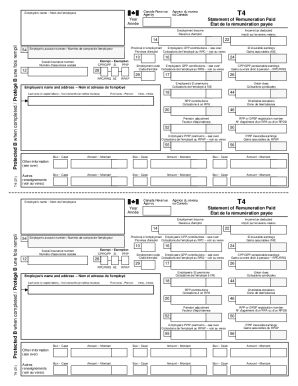
T4Employer 's name Not de l 'employeurStatement of Remuneration Paid that DE la remuneration payware Anne Employment income Revenue d 'emploiIncome tax deducted IMT SUR LE revenue retenuT4 (21)Province.
Open form follow the instructions
Easily sign the form with your finger
Send filled & signed form or save
How to fill out the Canada T4 online
The Canada T4 form, officially known as the Statement of Remuneration Paid, is crucial for reporting employment income and deductions to the Canada Revenue Agency. This guide provides a clear, step-by-step approach to accurately complete this form online.
Follow the steps to fill out your Canada T4 form online.
- Use the ‘Get Form’ button to acquire the Canada T4 form and access it in your preferred editor.
- Begin by entering the employer's name at the top of the form as requested. This information is essential for identification purposes.
- Fill in the year for which you are reporting the remuneration, as indicated on the form.
- Enter the total employment income you received during the year in the designated field.
- Specify the income tax that has been deducted from your earnings. This will be crucial for your tax return.
- Provide your social insurance number in the appropriate section to ensure proper identification.
- Include the province of employment, which may affect tax calculations.
- If applicable, complete the fields regarding employee contributions to the Canada Pension Plan (CPP) and Employment Insurance (EI).
- Add any union dues, pension adjustment, and other relevant contributions as outlined in the respective sections.
- Review all entered information for accuracy before finalizing.
- Once completed, save the changes, and consider downloading, printing, or sharing the form for your records.
Start filling out your Canada T4 form online today!
Experience a faster way to fill out and sign forms on the web. Access the most extensive library of templates available.
Related content
The nonimmigrant NAFTA Professional (TN) visa allows citizens of Canada and Mexico, as...
The Student Accounts Office will provide Canadian tax forms to students that are Canadian...
The Canada Revenue Agency is the revenue service of the Canadian federal government,...
Get answers to your most pressing questions about US Legal Forms API.
Does everyone get a T4 in Canada?
Generally, you need to fill out a T4 slip if you are an employer (resident or non-resident) and you paid your employees employment income, commissions, taxable allowances and benefits, fishing income, or any other remuneration.
When must T4 be issued in Canada?
Fill out and file all T4 slips and the T4 Summary using electronic filing methods, or on paper, within: 30 days from the date your business stops. 90 days from the date a partner or the sole proprietor dies.
How do I get my T4 in Canada?
go to “Tax information” select “Tax slips” from the drop-down menu, select the year of the tax slip you want to access. select “View” – a hyperlink to the tax slip will be displayed.
When should I get my T4 in Canada?
You should receive most of your slips (including your T4, T4A, and T5 slips) and receipts by the end of February. However, T3, and T5013 slips do not have to be sent before the end of March. To get your Old age security (OAS), employment insurance (EI) or Canada Pension Plan (CPP) slips, sign in to Service Canada.
How long does it take for T4 to come in?
If you need a T4 slip for the current tax year, your employer should be able to provide it to you. Employers are required to provide T4s by the end of February. For previous tax years, you can request a copy from the Canada Revenue Agency (CRA) or by calling 1-800-959-8281.
How much do you have to make to get a T4 in Canada?
Not everyone will have a filled out Box 40. Every employee in Canada who earns $500 or more in employment income within a calendar year (January 1 to December 31) must receive a T4 from every employer they work for.
Use professional pre-built templates to fill in and sign documents online faster. Get access to thousands of forms.
If you believe that this page should be taken down, please follow our DMCA take down process here.