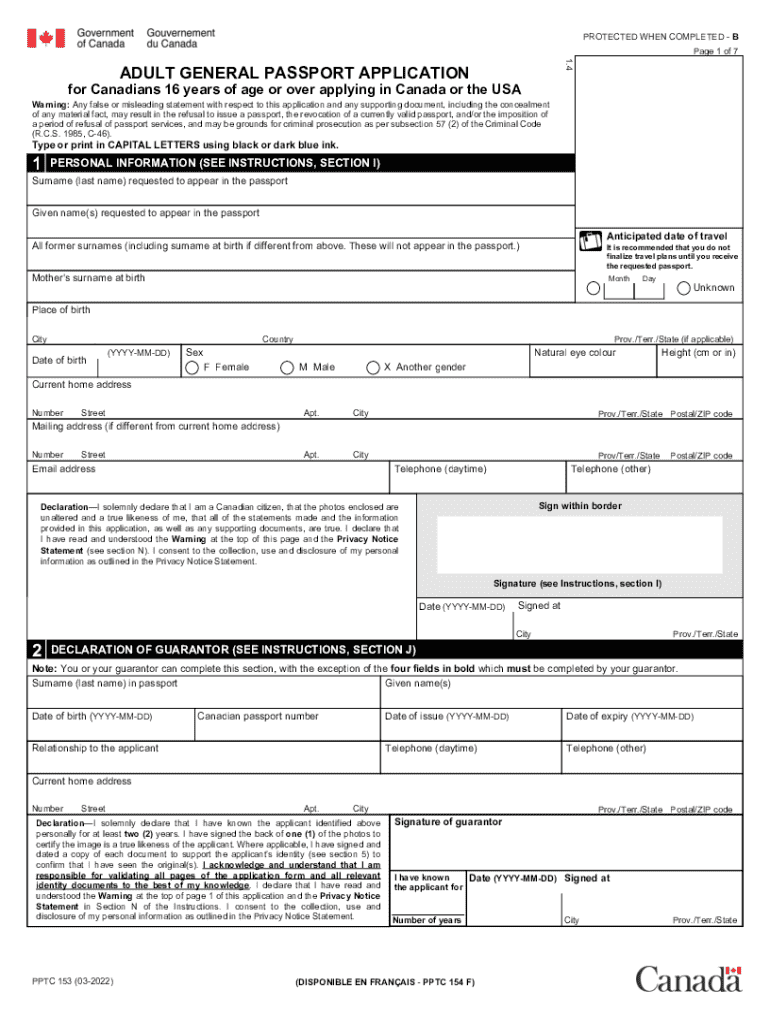
Isleading statement with respect to this application and any supporting document, including the concealment of any material fact, may result in the refusal to issue a passport, the revocation of a currently valid passport, and/or the imposition of a period of refusal of passport services, and may be grounds for criminal prosecution as per subsection 57 (2) of the Criminal Code (R.C.S. 1985, C-46). Read Instructions Type or print in CAPITAL LETTERS using black or dark blue ink. 1 PERSONAL INF.
Loading

Open form follow the instructions

Easily sign the form with your finger

Send filled & signed form or save
How to use or fill out the Pptc153.pdf - Save Reset Form PROTECTED WHEN COMPLETED - B Print Form online
Filling out the Pptc153.pdf form is an essential step for Canadians aged 16 and over applying for a general passport. This guide provides a clear, step-by-step approach to completing the form accurately and efficiently, ensuring users have the necessary information while navigating the process online.
Follow the steps to fill out the Pptc153.pdf form online.
- Click the ‘Get Form’ button to obtain the form and open it in your preferred digital editor.
- Begin with the Personal Information section. Use capital letters to fill in your surname, given names, anticipated date of travel, and any former surnames. Complete the fields for your mother's surname at birth, place of birth, date of birth, sex, eye color, height, current home address, mailing address (if different), email address, and telephone numbers.
- In the Declaration section, affirm your identity and the accuracy of the information provided. Sign and date this section as required.
- Next, complete the Declaration of Guarantor section. Ensure your guarantor fills out the necessary fields, including their own personal information and confirming their relationship with you.
- Address the Previous Canadian Travel Document section by indicating whether you have a prior Canadian travel document and providing details as necessary.
- Proceed to the Proof of Canadian Citizenship section. Attach the required documents depending on whether you were born in Canada or outside Canada.
- Complete the Documents to Support Identity section by listing valid identification as required.
- Select your desired period of validity (5-year or 10-year) in the Period of Validity section.
- Provide Additional Personal Information, detailing your addresses and occupations for the last two years.
- Fill in the References section, offering contact information for two persons who are not relatives or guarantors.
- Optionally, provide Emergency Contact Information for assistance while traveling.
- Once all sections are completed, review your form for accuracy, save the changes, and proceed to download, print, or share the form as needed.
Complete your passport application online today for a smoother travel experience.
Experience a faster way to fill out and sign forms on the web. Access the most extensive library of templates available.
Related content
Handbook of Final Year Research Project/Industrial Training Department of Computing and...
Use professional pre-built templates to fill in and sign documents online faster. Get access to thousands of forms.
If you believe that this page should be taken down, please follow our DMCA take down process here.
This form is available in several versions. Select the version you need from the drop-down list below.