Loading
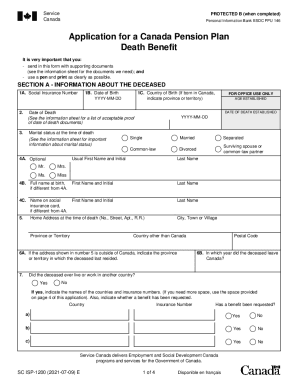
Get Canada Sc Isp-1200 2021
How it works
-

Open form follow the instructions
-

Easily sign the form with your finger
-

Send filled & signed form or save
How to fill out the Canada SC ISP-1200 online
The Canada SC ISP-1200 is an important form for applying for a Canada Pension Plan Death Benefit. This guide provides a straightforward approach to help you successfully complete the form online.
Follow the steps to fill out the Canada SC ISP-1200 effectively.
- Click ‘Get Form’ button to obtain the form and open it in your online editor.
- Complete Section A, which requires information about the deceased. Fill in the Social Insurance Number, Date of Birth, and Country of Birth in fields 1A, 1B, and 1C respectively. Ensure the date formats are correct, using YYYY-MM-DD.
- Continue in Section A by detailing the Date of Death and Marital Status in the respective fields. Make sure to provide the necessary documentation for proof as indicated in the information sheet.
- In Section A, fill out the names as required for fields 4A, 4B, and 4C, ensuring that you include any alternative names the deceased may have used.
- Provide the Home Address at the time of death in field 5, and complete the postal code and any additional address information requested in fields 6A and 6B.
- Answer the questions in Section A regarding the deceased's history with the Canada Pension Plan and other relevant benefits. If applicable, provide details in the space allowed.
- Move on to Section B to determine information about the settlement of the estate. Indicate whether there is a will in question 10, and if yes, provide the name and address of the executor.
- If there is no will, complete the relevant section to identify your role in the application process, whether as an administrator, partner, or responsible person.
- In Section C, fill in your own details as the applicant. Include your relationship to the deceased and select your language preference for communications.
- Complete Section D with a declaration statement, ensuring you sign and date the application. If necessary, involve a witness to sign in Section E.
- Review the completed application for accuracy, then save the changes, and download or print the form as needed for submission.
Complete your Canada SC ISP-1200 application online today.
Get form
Experience a faster way to fill out and sign forms on the web. Access the most extensive library of templates available.
Related links form
Inheriting a protected payment You'll inherit half of your partner's protected payment if your marriage or civil partnership with them began before 6 April 2016 and: their State Pension age is on or after 6 April 2016. they died on or after 6 April 2016.
Get This Form Now!
Use professional pre-built templates to fill in and sign documents online faster. Get access to thousands of forms.