Loading
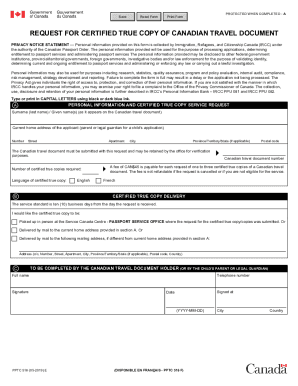
Get Canada Pptc 516 E 2019-2026
How it works
-

Open form follow the instructions
-

Easily sign the form with your finger
-

Send filled & signed form or save
How to fill out the Canada PPTC 516 E online
This guide is designed to assist users in filling out the Canada PPTC 516 E form for requesting certified true copies of Canadian travel documents. By following these clear steps, you can ensure a smooth online application process.
Follow the steps to fill out the Canada PPTC 516 E form online.
- Press the ‘Get Form’ button to download the form and open it in your digital editor.
- In section A, enter your surname (last name) and given name(s) exactly as they appear on your Canadian travel document.
- Provide your current home address, including the street number, street name, apartment number (if applicable), city, province or territory, and postal code.
- Specify your Canadian travel document number. This document must be submitted with your request as it may be retained for verification purposes.
- Select the number of certified true copies you wish to request. Note that a fee of CAN$45 is applicable for one to three copies.
- Indicate the preferred language for the certified true copy by selecting either French or English.
- In section B, choose how you would like to receive your certified true copy: either by picking it up in person at the Service Canada Centre or by having it delivered by mail to your current address or an alternative address.
- If you are selecting mail delivery, provide the necessary mailing address details, including the name, street number, street name, apartment number (if applicable), city, province or territory, postal code, and country.
- In section C, fill out your full name as the holder of the Canadian travel document (or the child's parent or legal guardian), sign the form, and provide your telephone number, along with the city and country where you are signing.
- Finally, date the form using the YYYY-MM-DD format. Review all provided information for accuracy.
- Once completed, save any changes, download, print, or share the form as necessary.
Complete your documents online for quick and efficient processing.
How do I know if I have an ePassport? All ePassports can be recognized by the internationally recognized symbol that is printed on the front cover. 2 This electronic passport symbol identifies the passport as an ePassport.