Loading
Get Au Post 8833774 2019-2026
How it works
-

Open form follow the instructions
-

Easily sign the form with your finger
-

Send filled & signed form or save
How to fill out the AU Post 8833774 online
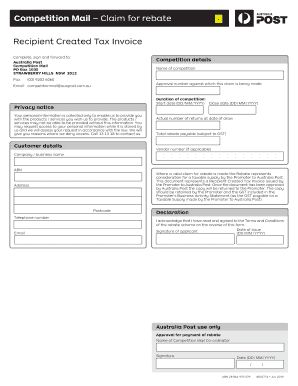
This guide provides detailed instructions on how to complete the AU Post 8833774 form online, ensuring a smooth and efficient process for users making a rebate claim. Follow this step-by-step guide to effectively navigate through each section of the form.
Follow the steps to accurately complete the AU Post 8833774 form.
- Press the ‘Get Form’ button to access the AU Post 8833774 form and open it in your browser.
- In the 'competition details' section, enter the name of the competition and the approval number for your claim.
- Fill in the duration of the competition by specifying both the start and close dates in the format DD/MM/YYYY.
- Provide your personal contact details in the 'customer details' section, including name, address, postcode, telephone number, and email.
- Indicate the actual number of returns at the date of the draw and calculate the total rebate payable, ensuring to include GST where applicable.
- Sign the declaration to confirm that you have read and understood the terms and conditions of the rebate scheme. Enter the date of issue.
- Make sure to include any additional required information as stipulated on the form. After completion, review all entered details for accuracy.
- Once you have filled out the form and verified that all information is correct, you can save your changes. Download, print, or share the form as needed to submit your claim.
Complete your AU Post 8833774 form online today to ensure your rebate claim is processed efficiently.
Expecting a parcel? You can see where it is by entering the tracking number. You can also do this with parcels you've sent through Australia Post.