Loading
Get Nz R30 2020-2026
How it works
-

Open form follow the instructions
-

Easily sign the form with your finger
-

Send filled & signed form or save
How to fill out the NZ R30 online
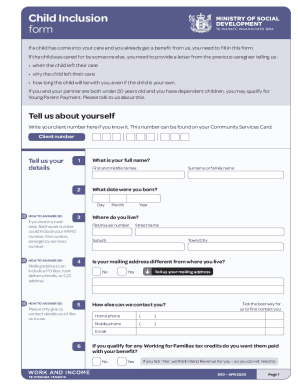
The NZ R30 form is essential for users who have a child coming into their care and are already receiving a benefit. This guide provides comprehensive, step-by-step instructions on how to complete the form online, ensuring you have all the necessary information at your fingertips.
Follow the steps to complete the NZ R30 form effectively.
- Click ‘Get Form’ button to obtain the form and open it in the editor.
- Enter your client number if you have it. This number can be found on your Community Services Card.
- Provide your full name by filling in your first and middle names.
- Indicate your birth date by selecting the day, month, and year.
- Enter your residential address including your flat/house number and street name. If you live in a rural area, include any relevant emergency numbers.
- If your mailing address differs from your residential address, tick 'Yes' and provide the mailing address.
- Provide your contact phone numbers, including home and mobile phone, and select your preferred method of contact via email.
- Indicate whether you want any Working for Families tax credits paid with your benefit by selecting 'Yes' or 'No'.
- For each dependent child you wish to include, provide the child’s full name, date of birth, and relationship to you.
- Attach the birth certificate for each child you are including.
- If a child has been known by another name, provide that name.
- Answer questions about previous caregivers and any shared custody arrangements you have.
- Indicate if you have applied, or will apply, for Paid Parental Leave, and if so, provide the end date of that leave.
- If you have more children to include, repeat the process from Step 9 for each additional child.
- After filling out all necessary fields, ensure everything is correct before moving to the declaration section.
- In the declaration section, read and affirm that the information provided is true and complete, then print your name, sign, and date the form.
- Finally, save your changes, download, print, or share the completed form as needed.
Complete your NZ R30 form online today!
Everyone travelling into New Zealand needs to complete a declaration. It is free and you can do it on the online form or the NZTD app. A declaration needs to be completed for each traveller, including babies and children. You can start your digital declaration at a time that suits you.