Loading
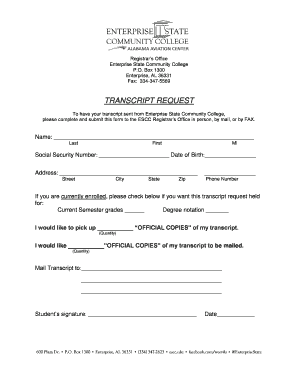
Get Enterprise State Community College Transcript Request
How it works
-

Open form follow the instructions
-

Easily sign the form with your finger
-

Send filled & signed form or save
How to fill out the Enterprise State Community College Transcript Request online
This guide provides clear and supportive instructions on how to successfully complete the Enterprise State Community College Transcript Request form online. Follow these steps to ensure your transcript request is processed efficiently.
Follow the steps to fill out your transcript request form online.
- Click ‘Get Form’ button to obtain the form and open it in the editor.
- Begin by entering your name in the designated fields, ensuring to fill in your last name, first name, and middle initial.
- Next, provide your social security number and date of birth in the respective fields to help identify your records.
- Fill in your current address, including street, city, state, and zip code to ensure accurate delivery.
- Input your phone number to allow for communication regarding your request.
- If you are currently enrolled, select the options to hold your transcript request for current semester grades or degree notation as necessary.
- Indicate how many official copies of your transcript you would like to pick up and how many should be mailed.
- Complete the 'Mail Transcript to' section by providing the recipient's address details clearly.
- Sign and date the form in the indicated fields to validate your request.
- Once all fields are filled, review your information for accuracy before finalizing your submission.
Complete your transcript request online today and ensure your academic records are sent promptly.
To access transcripts from Georgia State University (GSU), you should visit their student portal. Log in using your credentials to find the transcript request section. Complete the form as instructed, ensuring all information matches your records. After your request is processed, you will receive confirmation and updates through your email.