Loading
Get Nz Kiwi Bank Fm3038 2016-2026
How it works
-

Open form follow the instructions
-

Easily sign the form with your finger
-

Send filled & signed form or save
How to fill out the NZ Kiwi Bank FM3038 online
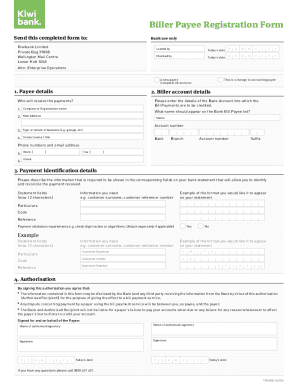
The NZ Kiwi Bank FM3038 is a crucial document for registering a new biller payee or updating existing payee details. This guide will provide clear, step-by-step instructions to help users efficiently complete the form online.
Follow the steps to fill out the NZ Kiwi Bank FM3038 online effectively.
- Click ‘Get Form’ button to obtain the form and open it in the editor.
- Indicate whether you are registering a new payee or changing details for an existing payee by selecting the appropriate option at the top of the form.
- In the 'Biller account details' section, provide the name of the company or organisation that will appear on the Bank Bill Payee list.
- Enter the mailing address for the payee, including the contact name, account number, bank, and branch information.
- Include the nature of the business and provide a contact phone number and email address for communications.
- In the 'Payment Identification details' section, describe the information that you want to appear on your bank statements to help identify payments received.
- Fill out the particulars and any specific reference codes you wish to use, following the example formats provided in the section.
- In the 'Authorisation' area, sign the form for and on behalf of the payee, ensuring all necessary details such as name and date are completed.
- Lastly, review all entered information for accuracy before submitting the form.
Ensure your biller registration is complete by filling out the NZ Kiwi Bank FM3038 online today!
Related links form
KIWINZ22 BIC / SWIFT Code - KIWIBANK LIMITED New Zealand - Wise.