Loading
Get Boa 00-53-2276nsbw 2010-2026
How it works
-

Open form follow the instructions
-

Easily sign the form with your finger
-

Send filled & signed form or save
How to fill out the BoA 00-53-2276NSBW online
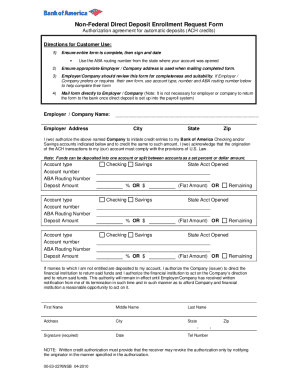
Filling out the BoA 00-53-2276NSBW form for direct deposit enrollment is an important step in managing your automatic deposits efficiently. This guide provides clear, step-by-step instructions to assist you in completing the form accurately.
Follow the steps to complete the form successfully.
- Click ‘Get Form’ button to obtain the form and open it in the editor.
- Begin by providing the employer or company name and address at the top of the form. Ensure the address is accurate for mailing purposes.
- In the section labeled 'I (we) authorize...', fill in the account type, account number, and ABA routing number for each checking or savings account. You may choose to split the deposit between multiple accounts by indicating the deposit amount for each.
- Ensure you fill in the state where each account was opened and whether the deposit will be a flat amount or a percentage of the total.
- Provide your first name, middle name (if applicable), last name, address, city, state, zip code, and telephone number. Make sure this information is accurate.
- Sign and date the form in the designated areas, ensuring the date reflects when you submit the form.
- Review the entire form for completeness and accuracy. It's advisable for the employer or company to review it as well before mailing.
- Mail the completed form directly to your employer or company. Note that it is not necessary for the employer or company to return the form to the bank once direct deposit is established.
- At this point, you may save changes, download, print, or share the form as needed for your records.
Start completing your BoA 00-53-2276NSBW form online today.
Here's how it works Send chase deposit slip online via email, link, or fax. You can also download it, export it or print it out. Send chase deposit slip online via email, link, or fax.