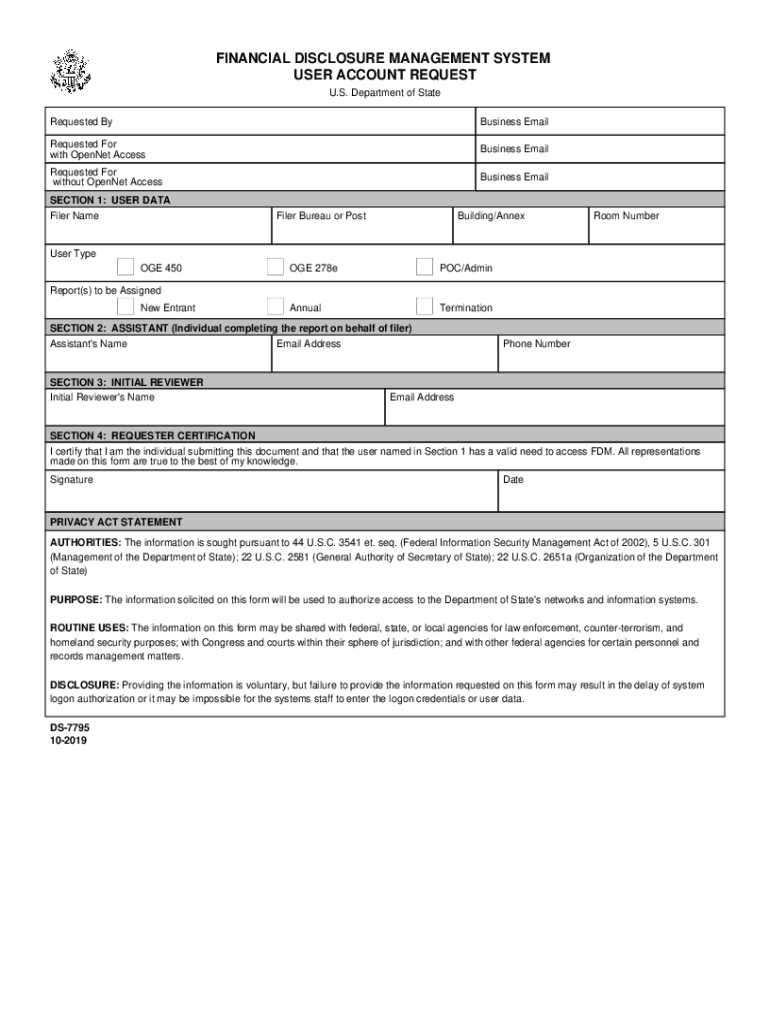
FINANCIAL DISCLOSURE MANAGEMENT SYSTEM USER ACCOUNT REQUEST U.S. Department of State Requested Business EmailRequested For with Opened AccessBusiness EmailRequested For without Opened AccessBusiness.
Loading

Open form follow the instructions

Easily sign the form with your finger

Send filled & signed form or save
How to fill out the DoS DS-7795 online
Filling out the DoS DS-7795 is a straightforward process that requires careful attention to each section of the form. This guide provides step-by-step instructions to ensure that users can complete the form efficiently and accurately.
Follow the steps to complete the DoS DS-7795 form online.
- Press the ‘Get Form’ button to access the form and open it in the editing interface.
- In the 'Requested By' section, enter your business email address to indicate who is initiating the request.
- Next, complete the 'Requested For' section by providing the business email of the user with OpenNet access, if applicable.
- If the user does not have OpenNet access, provide their business email address in the respective field.
- In 'SECTION 1: USER DATA', fill in the filer’s name, bureau or post, building/annex, room number, and user type. Choose from the options: OGE 450, OGE 278e, or POC/Admin and indicate if the report is annual or for termination.
- In 'SECTION 2: ASSISTANT', if an assistant is completing the form on behalf of the filer, enter their name and email address.
- Proceed to 'SECTION 3: INITIAL REVIEWER' and input the name, phone number, and email address of the initial reviewer.
- In 'SECTION 4: REQUESTER CERTIFICATION', indicate your agreement by certifying that you are the individual submitting the form. Sign and date the form to affirm that all information provided is accurate.
- After completing the form, review all entries for accuracy, make any necessary adjustments, and then save your changes.
- Finally, download the completed form or print it for your records. You may also share the document as needed.
Take the next step and complete your DoS DS-7795 form online today!
Experience a faster way to fill out and sign forms on the web. Access the most extensive library of templates available.
Related content
U.S. Department of State. Diplomacy in Action. Form Finder. Keyword: Category: All, DS...
dS efgZhgih[ lmVhXZnX. - 93962 ?@AB EFGABHF ?@HAGIF. oS pXqjifVZr sYYXrgfVjZ[ tV[njZhunf...
May 27, 2008 — Horizontal termination kit (SD: Basic Kit,. SEL: Kit A, SC: Standard Kit)...
Use professional pre-built templates to fill in and sign documents online faster. Get access to thousands of forms.
If you believe that this page should be taken down, please follow our DMCA take down process here.