Loading
Get Dos Ds-7768 2017-2026
How it works
-

Open form follow the instructions
-

Easily sign the form with your finger
-

Send filled & signed form or save
How to fill out the DoS DS-7768 online
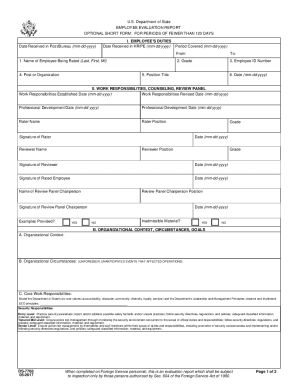
The DoS DS-7768 form is a crucial document used for evaluating the performance of employees within the U.S. Department of State for periods shorter than 120 days. This guide will provide you with clear and comprehensive instructions to help you successfully complete this form online.
Follow the steps to fill out the DoS DS-7768 with ease.
- Click the ‘Get Form’ button to access the DS-7768 form and open it in your digital workspace.
- Enter the 'Date Received in Post/Bureau' using the mm-dd-yyyy format to provide the date the report was received.
- Fill in the 'Employee's Duties' section, starting with the 'Name of Employee Being Rated' listed as Last, First, and Middle Initial.
- Specify the 'Period Covered' with the 'From' and 'To' dates in mm-dd-yyyy format to demarcate the evaluation timeframe.
- Complete fields for 'Grade,' 'Employee ID Number,' 'Position Title,' and 'Post or Organization' to provide relevant details about the employee.
- Record the 'Date' in mm-dd-yyyy format to indicate when the evaluation was completed.
- In the 'Work Responsibilities, Counseling, Review Panel' section, provide dates for 'Work Responsibilities Established' and 'Revised,' ensuring accuracy.
- List 'Professional Development' dates for any relevant training or education during the evaluation period.
- Fill in the names, positions, and signatures of the Rater and Reviewer, along with their respective grades and the date of evaluation.
- Complete the 'Organizational Context, Circumstances, Goals' section by detailing the context and circumstances relevant to the employee's work.
- Identify and list the core work responsibilities, ensuring they align with the Department's core values and leadership principles.
- Evaluate performance in the 'Evaluation of Performance' section, which should be done by the Rater.
- Document any 'Developmental Areas' that needed strengthening, providing specific examples from the rating period.
- If desired, the rated employee can provide an optional statement to address any issues or clarify aspects of the report.
- After completing all sections, save your changes, and download or print the form as necessary for submission or records.
Complete the DoS DS-7768 online now to ensure comprehensive and accurate employee evaluations.
Form DS-1948 is prepared by a tenured FSMS who is selected by the Chief Medical Officer and who should evaluate the employee's technical proficiency and professionalism in the medical field. The DS-1948 report provides selection and tenure boards with a technical medical perspective on the rated employee's performance.