Loading
Get Canada Pptc 056 E 2019
How it works
-

Open form follow the instructions
-

Easily sign the form with your finger
-

Send filled & signed form or save
How to fill out the Canada PPTC 056 E online
This guide provides a clear and comprehensive approach to filling out the Canada PPTC 056 E form online. It aims to assist users in accurately completing their passport application with confidence and ease.
Follow the steps to successfully complete your application.
- Click ‘Get Form’ button to initiate the process and download the form for online completion.
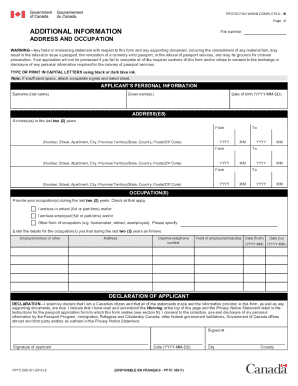
- Begin with the applicant's personal information. Fill in your surname (last name), given names, and date of birth in the specified format (YYYY-MM-DD). Ensure all names are correctly spelled and accurately entered.
- Provide your addresses for the last two years. Record each address using the format provided, ensuring you include the complete details such as number, street, apartment, city, province/territory/state, country, and postal/ZIP code within the required fields.
- Next, list your occupations for the last two years. Indicate whether you were a student (part-time or full-time), employed (part-time or full-time), or engaged in another form of occupation. Be sure to specify details, including employer/school name, address, daytime telephone number, field of employment/studies, and the date range for each occupation.
- Proceed to the declaration section. Confirm your Canadian citizenship and truthfulness of the information provided. Sign and date the form in the designated areas, including the city and country of signing. Make sure to review the warning and privacy notice before submission.
- After completing all sections, save your completed form. You can then choose to download, print, or share it as needed.
Complete your application online today to ensure a smooth passport processing experience.
Get form
Experience a faster way to fill out and sign forms on the web. Access the most extensive library of templates available.
An ePassport is also known as a biometric passport. It looks like a traditional passport book, but it has an electronic chip that is encoded with the same information found on page 2 of the passport (surname, given name, date of birth and sex). It also has a digital picture of the bearer's face.
Get This Form Now!
Use professional pre-built templates to fill in and sign documents online faster. Get access to thousands of forms.