Loading
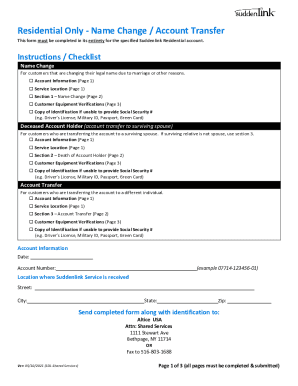
Get Suddenlink Residential Only - Name Change/account Transfer 2021-2026
How it works
-

Open form follow the instructions
-

Easily sign the form with your finger
-

Send filled & signed form or save
How to fill out the Suddenlink Residential Only - Name Change/Account Transfer online
This guide provides comprehensive instructions for users on how to complete the Suddenlink Residential Only - Name Change/Account Transfer form online. Whether you are changing your name, transferring to a surviving spouse, or transferring to a different individual, step-by-step guidance is included to ensure a smooth process.
Follow the steps to fill out the form accurately and efficiently.
- Press the ‘Get Form’ button to access the Suddenlink Residential Only - Name Change/Account Transfer form online.
- Begin by entering your account information in the specified fields on page 1. Provide your date and account number in the respective areas.
- Indicate the service location by filling out the street, city, state, and zip code where Suddenlink service is provided.
- On page 2, select the relevant section for your situation: Section 1 for a name change, Section 2 for a deceased account holder transfer to a surviving spouse, or Section 3 for transferring the account to another individual.
- In the selected section, enter the new account holder's name, Social Security number, and signature. If you choose not to provide your Social Security number, ensure to upload a copy of identification such as a driver’s license or passport.
- Proceed to page 3 and complete the required account verification information. You may provide the access code from your Suddenlink bill statement or record the serial number of your cable box/modem.
- Review all entered information for accuracy. Ensure all necessary identification documents are included before submission.
- After confirming all fields are filled correctly, save changes and choose to download, print, or share the completed form as needed.
Complete your Suddenlink Residential Only - Name Change/Account Transfer form online today for a hassle-free experience.
Suddenlink parent company Altice USA said that effective this week, the internet service provider is officially renamed Optimum, Altice's other broadband brand. The change had been in the works for a while, and Altice made its intentions public in April with its "Let's Reconnect" pledge.