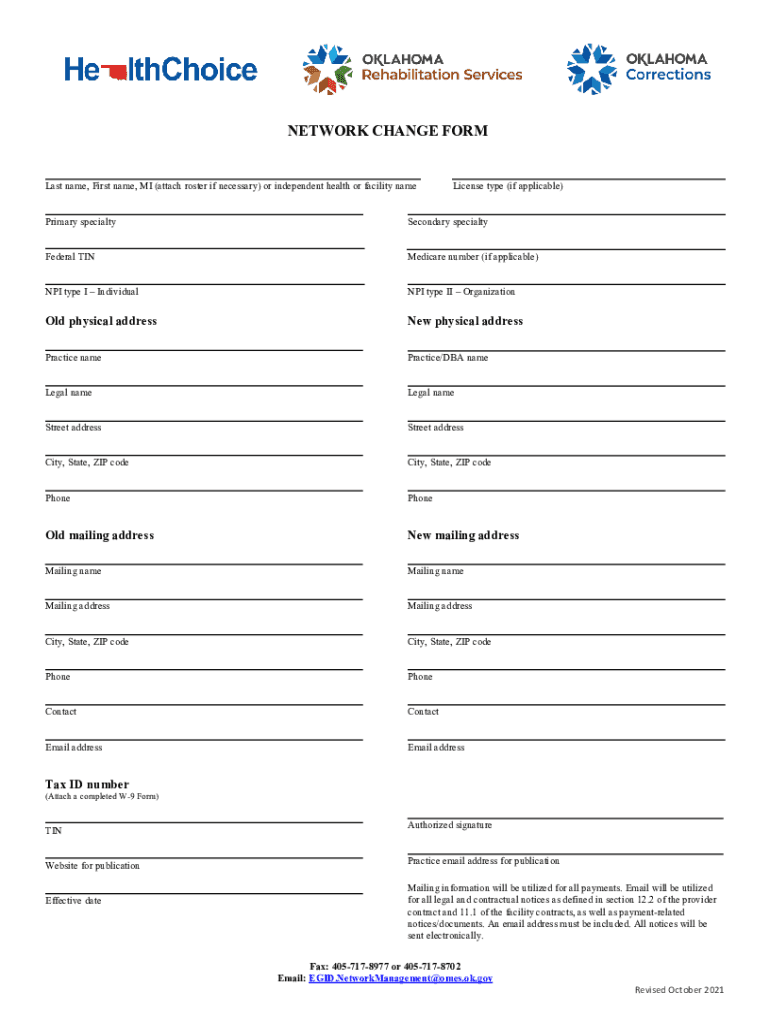
NETWORK CHANGE FORM Last name, First name, MI (attach roster if necessary) or independent health or facility nameLicense type (if applicable)Primary specialtySecondary specialty Federal TINMedicare.
Loading

Open form follow the instructions

Easily sign the form with your finger

Send filled & signed form or save
How to fill out the OK Network Change Form online
Filling out the OK Network Change Form online is an important step for users to ensure their information is current and accurate. This guide provides clear instructions on each section of the form to assist users in completing it efficiently.
Follow the steps to fill out the OK Network Change Form online.
- Click ‘Get Form’ button to obtain the form and open it for editing.
- Begin by entering your last name, first name, and middle initial in the designated fields. If necessary, attach a roster that includes this information or the name of your independent health facility.
- Indicate your license type, if applicable, and specify your primary and secondary specialties.
- For federal and Medicare identifiers, enter your Federal TIN and Medicare number, if applicable.
- Complete the NPI sections by entering your NPI type I for individuals and NPI type II for organizations.
- Update your physical address by providing both the old and new physical addresses as well as practice and legal names.
- Fill in the details for both old and new mailing addresses, including the mailing name and contact information.
- Provide your phone number and an email address for future correspondence, ensuring they are correct.
- Attach a completed W-9 Form if needed, and include your Tax ID number.
- Enter your publication website and the effective date for the changes.
- Sign the form using the authorized signature section provided.
- Finally, review all provided information for accuracy. Once confirmed, you can save changes, download, print, or share the completed form.
Complete the OK Network Change Form online today to ensure your information is up-to-date.
Experience a faster way to fill out and sign forms on the web. Access the most extensive library of templates available.
Related content
NetworkManagement@omes.ok.gov. Revised October 2021. NETWORK CHANGE FORM. Last name, First...
This form is used to delete computer system and network access for an employees at OUHSC...
It is critical that you notify HealthSmart when you have any changes to your demographics...
Use professional pre-built templates to fill in and sign documents online faster. Get access to thousands of forms.
If you believe that this page should be taken down, please follow our DMCA take down process here.