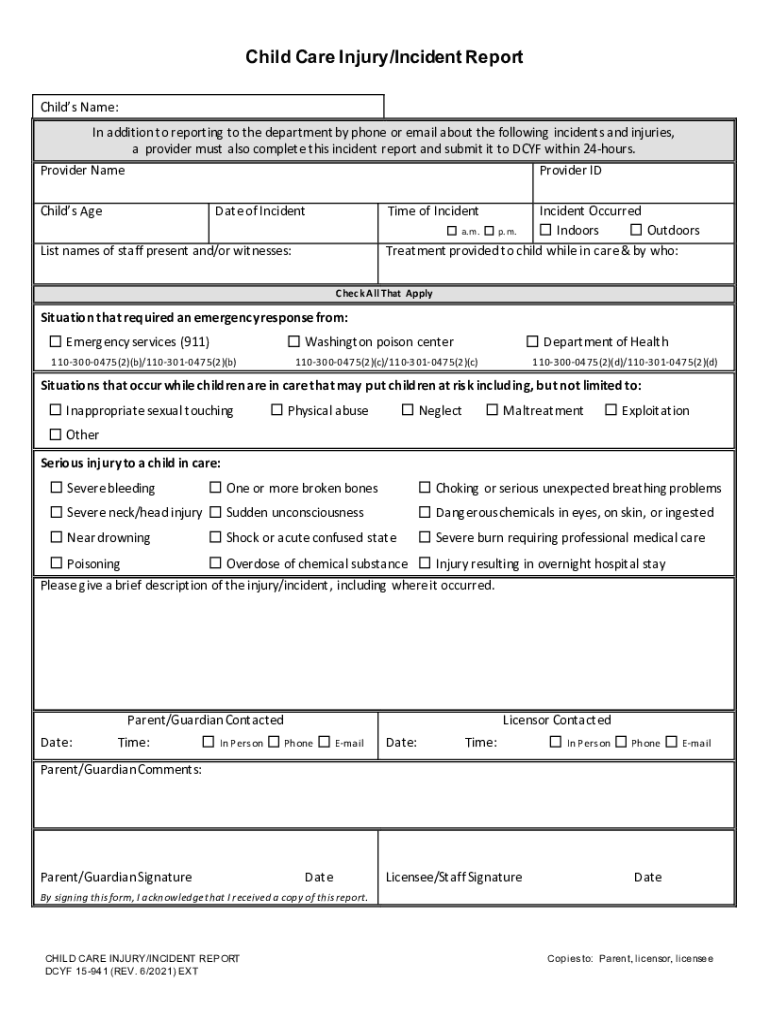
Child Care Injury/Incident Report Childs Name: In addition to reporting to the department by phone or email about the following incidents and injuries, a provider must also complete this incident.
Loading

Open form follow the instructions

Easily sign the form with your finger

Send filled & signed form or save
How to fill out the WA DCYF 15-941 online
The WA DCYF 15-941, also known as the Child Care Injury/Incident Report, is a critical document for reporting incidents or injuries that occur in child care settings. This guide provides step-by-step instructions on how to complete the form accurately and effectively online.
Follow the steps to successfully fill out your Child Care Injury/Incident Report.
- Click ‘Get Form’ button to obtain the form and open it in the online editor.
- Begin by entering the child’s name at the top of the form. Ensure that you spell the name correctly to avoid any confusion.
- Input the provider's name and provider ID. This information identifies who is reporting the incident and their credentials.
- Record the child’s age, date, and time of the incident. Use the format specified in the form to maintain consistency.
- Indicate whether the incident occurred indoors or outdoors by checking the appropriate box and specify a.m. or p.m. for the incident's timing.
- Detail the treatment that was provided to the child while in care, including names of the staff members who administered the treatment.
- List all staff present and/or witnesses to the incident in the designated area on the form.
- Check all applicable situations that required an emergency response, such as contacting emergency services or the poison center.
- If there was a serious injury, select the type of injury from the options provided. Be specific to ensure proper documentation.
- Provide a brief description of the incident, including the exact location where it took place.
- Document whether the parent/guardian has been contacted, including the date and time of this communication.
- If applicable, input the licensor's contact details, including the date and time of contact.
- Include any comments from the parent/guardian in the designated area on the form.
- Both the parent/guardian and licensee/staff must sign and date the form to acknowledge receipt and accuracy.
- Once you have completed all sections of the form, save your changes. You can then download, print, or share the form as needed.
Complete your documents online to ensure timely and efficient reporting.
Experience a faster way to fill out and sign forms on the web. Access the most extensive library of templates available.
Related content
a provider must also complete this incident report and submit it to DCYF within 24-hours...
Mar 16, 2021 — DCYF 15-941 (REV. 10/2019) INT/EXT. Child Care Injury/Incident Report...
Get answers to your most pressing questions about US Legal Forms API.
How much does DSHS pay for child care in Washington state?
2.3. 7 What are WCCC copayments? If household income is:Then the household's maximum monthly copayment is:0 to 20% SMINo copayMore than 20% to 36% SMI$65 CopayMore that 36% to 50% SMI$90 CopayMore than 50% to 60% SMI$115 Copay. Families over 60% SMI at application are not eligible.1 more row
What does DCYF do in Washington state?
What We Do. DCYF is the lead agency for state-funded services that support children and families to build resilience and health, and to improve educational outcomes. We accomplish this by partnering with state and local agencies, tribes and other organizations in communities across the state of Washington.
How do I contact the foster system in Washington state?
If you'd like to talk to someone about fostering, call 1-888-KIDS-414.
What is the income limit for child care assistance in Washington state?
Income Eligibility Family Size$0 Copay (0%-20% SMI)$65 Copay (20%-36% SMI)1$0 to $973$974 to $1,7512$0 to $1,272$1,273 to $2,2903$0 to $1,572$1,573 to $2,8294$0 to $1,871$1,872 to $3,36816 more rows
Can a grandparent get paid for childcare in Washington state?
Some families qualify for help to pay their family, friend or neighbor (FFN) child care. This is called a subsidy. Caregivers can be paid by the state for caring for children of eligible families.
How much does DCYF pay for childcare in Washington state?
In ance with the collective bargaining agreement with Service Employees International Union (SEIU) 925, beginning on July 1, 2022, the child care subsidy base rate for Family, Friends, and Neighbor providers will increase to $3 per child per hour. DCYF will update authorizations automatically.
What are the rules for daycare in Washington state?
Licensed child care centers and family child care homes must pass a criminal background check, attend initial and ongoing training, and pass health and safety inspections. The number of children who can be cared for by one adult is limited by licensing regulations.
Use professional pre-built templates to fill in and sign documents online faster. Get access to thousands of forms.
If you believe that this page should be taken down, please follow our DMCA take down process here.