Loading
Get Canada Tbaytel T046 2017-2026
How it works
-

Open form follow the instructions
-

Easily sign the form with your finger
-

Send filled & signed form or save
How to fill out the Canada Tbaytel T046 online
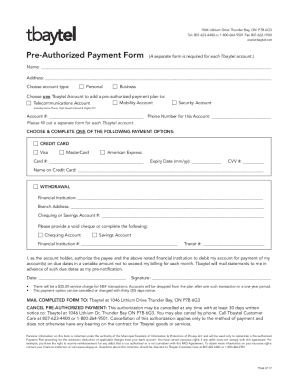
Filling out the Canada Tbaytel T046 form is an essential step for people who wish to set up a pre-authorized payment plan for their Tbaytel account. This guide provides you with clear and instructive steps to complete the form efficiently.
Follow the steps to complete the Canada Tbaytel T046 form online.
- Press the ‘Get Form’ button to access the form and display it in your editor.
- Begin by entering your full name in the designated field. This information is vital for Tbaytel to identify the account holder.
- Next, provide your complete address, ensuring it is accurate and up-to-date.
- Select your account type by choosing either 'Personal' or 'Business'.
- Choose one Tbaytel account to add the pre-authorized payment plan to, selecting from 'Mobility Account', 'Telecommunications Account', or 'Security Account'.
- Input the account number associated with the Tbaytel account you selected.
- Enter the phone number for this account for verification purposes.
- Choose your preferred payment method by selecting either 'Credit Card' or 'Withdrawal'. Complete the appropriate fields based on your selection.
- If choosing 'Credit Card', fill out the card number, expiry date, CVV, and name on the credit card.
- If opting for 'Withdrawal', provide your financial institution's name and branch address, along with the chequing or savings account number. Indicate your account type and provide your financial institution and transit numbers.
- Sign and date the form to authorize Tbaytel to debit your account for payments according to the agreement.
- After filling out the form, review all provided information for accuracy before saving changes, downloading, printing, or sharing the completed form.
Complete your Tbaytel T046 form online today to conveniently set up your pre-authorized payment plan.
Mon-Fri: 9:30am - 5:30pm. Sat-Sun: CLOSED.