Loading
Get Canada Sc Ins5140 2017-2026
How it works
-

Open form follow the instructions
-

Easily sign the form with your finger
-

Send filled & signed form or save
How to fill out the Canada SC INS5140 online
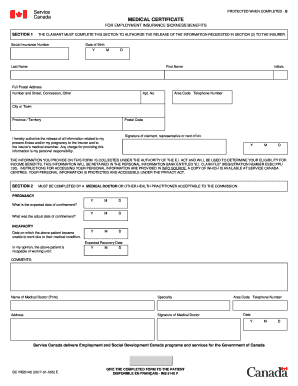
The Canada SC INS5140 is a medical certificate essential for Employment Insurance sickness benefits. This guide will provide step-by-step instructions on how to complete this form online, ensuring you submit accurate and necessary information.
Follow the steps to fill out the form correctly.
- Press the ‘Get Form’ button to access the document and open it for editing.
- In Section 1, enter your social insurance number in the designated field. Next, provide your date of birth by selecting the year, month, and day.
- Next, include your area code and telephone number. Sign the form as the claimant, representative, or next of kin, authorizing the release of your medical information to the insurer. Remember to include the date of your signature.
- Proceed to Section 2, which must be filled out by a medical doctor or other acceptable health practitioner. Provide the expected date of confinement and the actual date of confinement for pregnancy-related claims.
- Document comments, name, specialization, and address of the medical doctor completing this section. Ensure the doctor signs the form, includes their area code and telephone number, and the date of signing.
- Once you have filled out all necessary sections, review the information for accuracy before saving your changes. You can then download, print, or share the completed form as needed.
Start filling out your Canada SC INS5140 form online today to ensure you receive your benefits promptly.