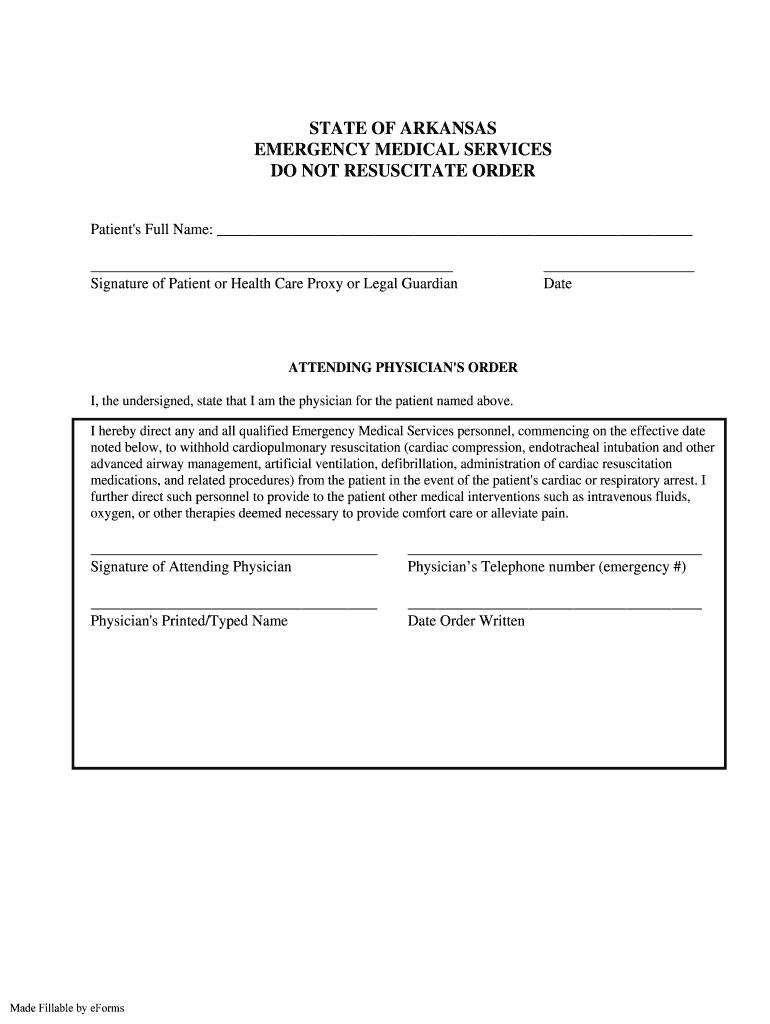
Signature of Patient or Health Care Proxy or Legal Guardian Date ATTENDING PHYSICIAN'S ORDER I, the undersigned, state that I am the physician for the patient named above. I hereby direct any and all qualified Emergency Medical Services personnel, commencing on the effective date noted below, to withhold cardiopulmonary resuscitation (cardiac compression, endotracheal intubation and other advanced airway management, artificial ventilation, defibrillation, administration of.
Loading

Open form follow the instructions

Easily sign the form with your finger

Send filled & signed form or save
How to fill out the AR Do Not Resuscitate online
The AR Do Not Resuscitate order is a critical document that allows individuals to express their preferences regarding resuscitation efforts in medical emergencies. This guide provides clear, step-by-step instructions for completing the form online to ensure your wishes are accurately recorded and respected.
Follow the steps to complete your AR Do Not Resuscitate order online.
- Click ‘Get Form’ button to obtain the form and open it in the editor where you can make the necessary entries.
- In the first section, enter the patient's full name in the designated field. Ensure that the name is spelled correctly to avoid any confusion.
- Next, the form requires the signature of the patient, health care proxy, or legal guardian. In the provided space, the appropriate person should sign, confirming their consent to the order.
- You will need to enter the date when the signature was provided. This helps establish the validity of the document.
- In the 'Attending Physician's Order' section, the attending physician must state their name clearly in the appropriate space, affirming they are the physician for the patient named.
- The physician is required to sign the document, providing their approval for withholding resuscitation measures under specified conditions.
- Additionally, the physician should include their emergency telephone number to ensure they can be contacted if needed for clarification on the order.
- Next, the physician must print or type their name to ensure clarity and avoid any misinterpretation.
- Lastly, record the date when the order was written. This will mark the effective date of the DNR order.
- Once all fields are filled out completely, users can save changes, download the completed order, print it for their records, or share it with the appropriate health care providers.
Complete your AR Do Not Resuscitate order online today to ensure your medical preferences are respected.
Experience a faster way to fill out and sign forms on the web. Access the most extensive library of templates available.
Related content
“Emergency Medical Services Do Not Resuscitate (“EMS/DNR”) Order Implementation...
"Emergency Medical Services Do Not Resuscitate ("EMS/DNR") Order Implementation Protocol"...
Five Wishes is a United States advance directive created by the non-profit organization...
Get answers to your most pressing questions about US Legal Forms API.
How bad is it to resuscitate a DNR?
Medical professionals who give CPR to people with a DNR order can potentially get into trouble—if they are aware of the DNR. The legal ramifications of giving CPR to someone with a DNR are complex. In some states, DNR orders are only valid within a hospital setting; outside of that, they don't apply.
How do I get my DNR in NC?
These forms are available only to physicians' offices or other licensed hospital or healthcare facilities. To purchase DNR and MOST forms, use the DNR and MOST order form: DNR & MOST Order Form (PDF, 54 KB)
How do I get a DNR in Arkansas?
When submitted to a hospital, an individual can request this form through their physician. Alternatively, one could ask their physician ahead of time for a DNR form, which would alert emergency responders/personnel, paramedics, etc. of the individual's wishes.
How do I choose a DNR?
If you decide you want a DNR order, tell your doctor and health care team what you want. Your doctor must follow your wishes, or: Your doctor may transfer your care to a doctor who will carry out your wishes.
What are the rules around DNR?
Generally, a DNR order should not be entered into the patient's medical record without concurrence of the parents. However, a DNR order may be entered by the patient's physician without parental permission if CPR is determined to be physiologically futile or non-therapeutic, in ance with Paragraphs E and F below.
What is needed for a DNR order to be valid?
Regardless of the format or the venue, DNR orders almost always follow the same general rules to be valid: DNR orders must be written by medical professionals rather than verbalized. ... Written DNR orders must include the patient's name. ... DNR orders must be dated. ... The DNR order must be signed by the healthcare provider.
What are the 2 types of DNR?
Did you know that there are two different types of DNR orders that can be chosen? The first is the DNR Comfort Care (DNRCC) and the other is the DNR Comfort Care- Arrest (DNRCC-Arrest).
What does do not resuscitate order mean?
A DNR is a request not to have CPR if your heart stops or if you stop breathing. You can use an advance directive form or tell your doctor that you don't want to be resuscitated. Your doctor will put the DNR order in your medical chart.
Use professional pre-built templates to fill in and sign documents online faster. Get access to thousands of forms.
If you believe that this page should be taken down, please follow our DMCA take down process here.