Loading
Get Ca Staff Registration Form - Sacramento County 2020-2026
How it works
-

Open form follow the instructions
-

Easily sign the form with your finger
-

Send filled & signed form or save
How to fill out the CA Staff Registration Form - Sacramento County online
The CA Staff Registration Form for Sacramento County is a vital document for health service staff members seeking registration in the Behavioral Health Services Division. This guide provides comprehensive and user-friendly instructions to help users fill out the form online efficiently and accurately.
Follow the steps to complete the CA Staff Registration Form online
- Click the ‘Get Form’ button to access the CA Staff Registration Form and open it in your preferred editing platform.
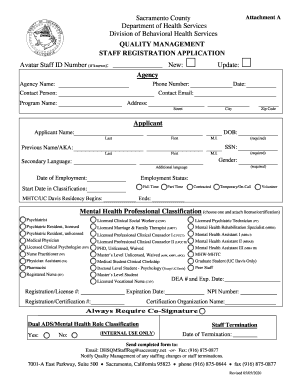
- Begin by filling in your Avatar Staff ID Number if you have one. If you are new to the agency, indicate 'New' in the designated area and enter the agency name along with your phone number, contact person's name, date, and contact email.
- Under the 'Applicant' section, input your full name, including last name, first name, and middle initial. Fill in your date of birth (DOB) and social security number (SSN). If applicable, also include your previous name or any aliases.
- Indicate your gender and any secondary language you may speak. Fill in your date of employment and select your employment status from the options: Full Time, Part Time, Contracted, Temporary/On-Call, Volunteer.
- Provide your start date in classification and if applicable, enter the dates for the MHTC/UC Davis Residency.
- Select your mental health professional classification from the list provided. Attach any required license or certification documentation.
- Fill in your registration/license number and expiration date, as well as your registration/certification number.
- If you are a Mental Health Assistant III or equivalent, fill in your NPI number and the name of the certification organization. Specify whether a co-signature is always required and if you have a dual ADS/Mental Health role classification.
- In the case of staff termination, record the date of termination if applicable.
- After completing all sections, save the changes to your form. You can download, print, or share the finalized form as needed. Ensure to send the completed form to the specified email or fax number.
Complete your CA Staff Registration Form online today for a smooth registration process.