Loading
Get Da 2802 1976-2026
How it works
-

Open form follow the instructions
-

Easily sign the form with your finger
-

Send filled & signed form or save
How to fill out the DA 2802 online
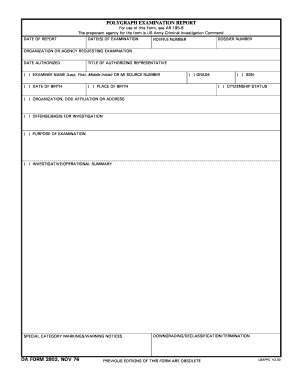
The DA 2802 is an essential document used for polygraph examination reports. This guide provides clear, step-by-step instructions to assist users in completing the form online, ensuring accuracy and compliance with the relevant guidelines.
Follow the steps to fill out the DA 2802 online successfully.
- Press the ‘Get Form’ button to obtain the DA 2802 document and open it for editing.
- Begin by entering the date of the report in the designated field, marking the official date when the examination took place.
- Input the date(s) of examination; specify all relevant dates when the polygraph was administered.
- Record the dossier number and ROI/file number, ensuring that you use the correct identifiers as per the agency’s records.
- In the section for organization or agency requesting the examination, provide the full name of the requesting organization.
- Fill in the date authorized section with the date when the examination was approved.
- Enter the title of the authorizing representative who has permitted the examination.
- Include the examinee's name, using their last name, first name, and middle initial as required in the field.
- Specify the examinee's date of birth, ensuring the format is consistent with other sections.
- Record the examinee's grade and place of birth in their respective fields for identification purposes.
- Fill in the SSN (social security number) of the examinee securely and accurately.
- Indicate the citizenship status of the examinee, selecting the appropriate option provided.
- Clearly write the examinee's organization, DOD affiliation, or full address.
- Detail the offense or basis for the investigation in the designated area for clarity.
- Describe the purpose of the examination to provide context for the report.
- Summarize the investigative or operational details that pertain to the examination.
- If applicable, mark special category markings or warning notices that are necessary.
- Fill in the location of examination where the polygraph took place.
- In the synopsis of results, indicate whether deception was indicated, inconclusive, or if there were any unusual physiological responses.
- Provide information regarding the examiner and their organization, including signature upon completion.
- Finally, save your changes, and download, print, or share the form as required.
Complete your DA 2802 online today for efficient document management.
At the Military Entrance Processing Station (MEPS), several forms may need to be filled out, including the medical questionnaire and background checks. These forms help assess your eligibility for military service. Being prepared with the right documentation can expedite your processing. For forms such as DA 2802 and others, resources like USLegalForms provide essential support to navigate through the requirements smoothly.