Loading
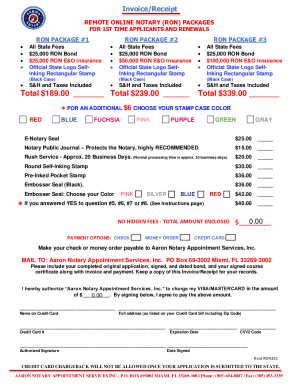
Get Fl Aaron Notary Invoice/receipt 2021-2026
How it works
-

Open form follow the instructions
-

Easily sign the form with your finger
-

Send filled & signed form or save
How to fill out the FL Aaron Notary Invoice/Receipt online
This guide aims to assist users in effectively completing the FL Aaron Notary Invoice/Receipt online, ensuring all necessary information is accurately captured. Whether you are a first-time applicant or renewing your notary service, these detailed instructions will facilitate the process.
Follow the steps to complete the FL Aaron Notary Invoice/Receipt online.
- Press the ‘Get Form’ button to access the invoice/receipt form and open it in your preferred online editor.
- Populate the personal information section with your full name, home address, and contact details. Be sure to use the format specified, ensuring all names and addresses are clearly presented.
- Select the appropriate RON package that fits your needs from the listed options and note the corresponding total amount for each package.
- If applicable, choose additional items such as stamp case colors, e-notary seal, notary journal, and rush service, entering the respective amounts into the total.
- Ensure that you fill out any required fields concerning payment options and include a total amount enclosed at the end of the form.
- If paying by credit card, complete the credit card information section, including your signature and the date signed, to authorize the payment.
- Review all completed sections of the form for completeness and accuracy before finally saving, downloading, printing, or sharing the document as needed.
Complete your documents online today for a streamlined experience.
To renew your notary commission in Florida, you must: 3- Pay a $39 state filing fee. 4- Purchase a new Florida notary stamp.