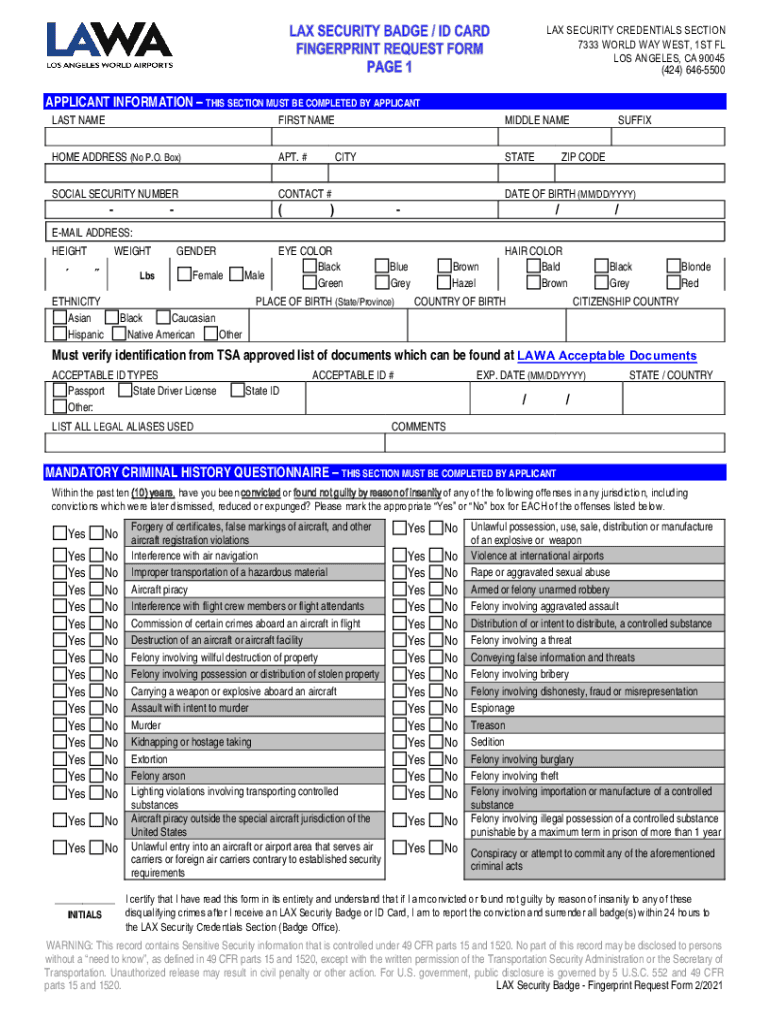
LAX SECURITY CREDENTIALS SECTION 7333 WORLD WAY WEST, 1ST FL LOS ANGELES, CA 90045 (424) 6465500APPLICANT INFORMATION THIS SECTION MUST BE COMPLETED BY APPLICANT LAST NAMEFIRST NAMEHOME ADDRESS (No.
Loading

Open form follow the instructions

Easily sign the form with your finger

Send filled & signed form or save
How to fill out the CA LAX Security Badge / ID Card Fingerprint Request Form online
Filling out the CA LAX Security Badge / ID Card Fingerprint Request Form online is a crucial step for individuals seeking access to secure areas at Los Angeles International Airport. This guide will provide you with clear, step-by-step instructions to help ensure that you complete the form accurately and efficiently.
Follow the steps to successfully complete the fingerprint request form.
- Click the ‘Get Form’ button to obtain the form and open it for editing.
- Begin by entering your personal information in the Applicant Information section. Provide your last name, first name, middle name, suffix, and date of birth in the specified format (MM/DD/YYYY). Ensure that you enter your home address, including apartment number if applicable, city, state, and zip code accurately. Contact information, including your phone number and email address, must also be included.
- Next, fill in your physical characteristics such as height, weight, eye color, and hair color. Be sure to select your ethnicity from the options provided.
- Input your citizenship country and place of birth. If you have any legal aliases, list them in the designated field.
- In the Acceptable ID Types section, select and enter your identification type, such as a passport or state driver license. Note the acceptable ID number and expiration date.
- Address the Mandatory Criminal History Questionnaire by marking the appropriate 'Yes' or 'No' boxes for each of the listed offenses. This section is critical for your application approval.
- Carefully read and initial the certification statement regarding your understanding of the form and the penalties for false statements.
- Complete the Privacy Act Notice and Employee Certification section by providing your signature, date of birth, and social security number.
- Then, move to the Signatory Authority Information section to be filled out by your employer. Ensure that the authorized individual completes their part correctly.
- Finally, review all entered information for accuracy, save your changes, and choose to either download, print, or share the completed form as needed.
Start completing your CA LAX Security Badge / ID Card Fingerprint Request Form online today.
Experience a faster way to fill out and sign forms on the web. Access the most extensive library of templates available.
Related content
A website for the State of California, Department of Consumer Affairs, Bureau of Security...
DO NOT SIGN 17B. Fingerprint Request Form. Check: Health Professions Trainee; Under...
Form 9 – Volunteer Driver Job Application (Cont.). ... Photo identification cards are...
Use professional pre-built templates to fill in and sign documents online faster. Get access to thousands of forms.
If you believe that this page should be taken down, please follow our DMCA take down process here.