Loading
Form preview
  • US Legal Forms
  • Other Templates
  • More Forms
  • More Multi-State Forms
  • Application For Statement Of Ownership 2020

Get Application For Statement Of Ownership 2020-2026

How it works

  1. Open form

    Open form follow the instructions

  2. Easily sign form

    Easily sign the form with your finger

  3. Share form

    Send filled & signed form or save

How to fill out the Application For Statement Of Ownership online

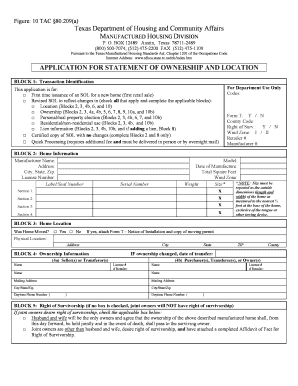
The Application For Statement Of Ownership is a vital document for individuals seeking to establish ownership of a manufactured home in Texas. This guide will provide you with clear, step-by-step instructions to complete this form efficiently and accurately online.

Follow the steps to successfully complete your application.

  1. Click the ‘Get Form’ button to access the form and open it in your browser.
  2. In Block 1, select the appropriate transaction type by checking one or more boxes that reflect your application purpose, such as 'first time issuance' or 'revised SOL.' Make sure you provide any additional required information corresponding to your selection.
  3. In Block 2, fill in the home information, including the manufacturer name, address, license number, label/seal number, and model. Be precise with the measurements as they need to be reported accurately.
  4. In Block 3, specify whether the home has been moved by selecting 'Yes' or 'No.' If you select 'Yes,' ensure to attach Form T – Notice of Installation along with the necessary moving permit.
  5. In Block 4, provide ownership information. Fill in names, mailing addresses, and license numbers if applicable for both the purchasers and sellers. Make sure to indicate the date of transfer if the ownership has changed.
  6. In Block 5, check the appropriate box to indicate if joint owners desire the right of survivorship. This is important for defining ownership rights in case of death.
  7. In Block 6, choose between treating the home as personal or real property. Select the appropriate box and provide a legal description if electing real property status.
  8. In Block 7, designate the use of the home as either residential or non-residential by selecting the appropriate checkbox.
  9. In Block 8, specify any liens or encumbrances on the home, including the details of lienholders and associated dates.
  10. In Block 9, if applicable, provide third party mailing instructions for copies requested by individuals other than the owner or lienholder.
  11. Finally, in Block 10, ensure that all required signatures are provided. Each seller and purchaser must sign, followed by notarization.
  12. Once you have completed all sections, review your form for accuracy. You can then save your changes, download the document, print it, or share it as needed.

Complete your Application For Statement Of Ownership online today to ensure a smooth ownership process.

Get form

Experience a faster way to fill out and sign forms on the web. Access the most extensive library of templates available.
Get form

Related content

Application for Statement of Ownership
The filing of an application for the issuance of a Statement of Ownership later than sixty...
Learn more
15 CFR § 971.206 - Statement of ownership.
§ 971.206 Statement of ownership. (a) General. The application must include sufficient...
Learn more
New York State Medicaid Enrollment Form
Has there been a change of ownership or control within the last 12 months to any of the...
Learn more

Related links form

Education Tracking Form - Sevrar Warning Camping Reservations Will Not Be Accepted Without Completed Entry Form, Including All Cityofthornton Form Sun Style Of Taijiquan 73 Movements Competition Form 1991. Taijiquan, Sun 73 Form, Tai Chi Chuan

Questions & Answers

Get answers to your most pressing questions about US Legal Forms API.

Contact support

To write a statement of ownership, begin by clearly identifying yourself as the owner, including your name and address. Next, describe the property in detail, including its location and any identification numbers. Once you draft this statement, you may need to complete the Application For Statement Of Ownership to have this document recognized by the appropriate authorities.

A proof of ownership statement is a document that verifies an individual's claim to ownership of a property. This statement typically includes crucial details such as the owner's name, property description, and transaction history. When you file an Application For Statement Of Ownership, you create an official record that serves as this proof.

The SOL, or Statement Of Ownership, in Texas serves as a formal document certifying ownership of personal property, including mobile homes. This paperwork is crucial for legal recognition and helps prevent disputes over ownership. By utilizing this application, you can ensure your ownership is recorded accurately in state databases.

The Texas Department of Housing and Community Affairs oversees housing policies, programs, and services in Texas. They ensure that residents have access to safe and affordable housing, and they regulate mobile home transactions. Their role includes processing the Application For Statement Of Ownership to help individuals establish clear ownership of properties.

A SOL application, or Statement Of Ownership application, in Texas is used to register the ownership of personal property, such as mobile homes. This application formally documents the transfer of ownership, ensuring that the necessary records are updated with the Texas Department of Housing. Submitting this application protects your legal rights as an owner.

In Texas, a mobile home can be considered real property if it is permanently affixed to land and you file the necessary paperwork. To establish this status, you typically must submit an Application For Statement Of Ownership, transforming your mobile home’s classification. This distinction is important because it affects property taxes and your ability to obtain financing.

Proof of ownership in Texas typically involves providing a title deed or a similar document that shows you hold legal title to the property. This document confirms your claim as the owner and is essential for various transactions, such as selling or mortgaging your home. If you need help, the Application For Statement Of Ownership can assist in officially documenting ownership.

To write a letter of ownership, begin by stating your name and address, followed by the date. Clearly articulate your claim by providing a detailed description of the property. Including clauses that express your intent to assert ownership will enhance the effectiveness of your Application For Statement Of Ownership, making it stronger and more precise.

A statement of ownership letter is a written assertion confirming that an individual or business owns a specific asset. This letter typically includes pertinent details such as the ownership period, asset description, and owner's signature. Crafting an Application For Statement Of Ownership requires this letter to fulfill legal requirements and assert rights effectively.

A declaration of ownership can be written by clearly stating your intent to claim ownership over a specified property. Start with your personal information, then describe the property in detail, including its location and characteristics. It’s beneficial to follow a template found on uslegalforms, which can assist in formatting your Application For Statement Of Ownership correctly.

Get This Form Now!

Use professional pre-built templates to fill in and sign documents online faster. Get access to thousands of forms.
Get form
If you believe that this page should be taken down, please follow our DMCA take down processhere.
Get Application For Statement Of Ownership
Get form
  • Adoption
  • Bankruptcy
  • Contractors
  • Divorce
  • Home Sales
  • Employment
  • Identity Theft
  • Incorporation
  • Landlord Tenant
  • Living Trust
  • Name Change
  • Personal Planning
  • Small Business
  • Wills & Estates
  • Packages A-Z
  • Affidavits
  • Bankruptcy
  • Bill of Sale
  • Corporate - LLC
  • Divorce
  • Employment
  • Identity Theft
  • Internet Technology
  • Landlord Tenant
  • Living Wills
  • Name Change
  • Power of Attorney
  • Real Estate
  • Small Estates
  • Wills
  • All Forms
  • Forms A-Z
  • Other Templates
  • Legal Hub
  • About Us
  • Help Portal
  • Legal Resources
  • Blog
  • Affiliates
  • Contact Us
  • Delete My Account
  • Site Map
  • Industries
  • Forms in Spanish
  • Localized Forms
  • State-specific Forms
  • Forms Kit
  • Real Estate Handbook
  • All Guides
  • Notarize
  • Incorporation services
  • For Consumers
  • For Small Business
  • For Attorneys
  • USLegal
  • FormsPass
  • pdfFiller
  • signNow
  • altaFlow
  • DocHub
  • Instapage
Form Packages
  • Adoption
  • Bankruptcy
  • Contractors
  • Divorce
  • Home Sales
  • Employment
  • Identity Theft
  • Incorporation
  • Landlord Tenant
  • Living Trust
  • Name Change
  • Personal Planning
  • Small Business
  • Wills & Estates
  • Packages A-Z
Form Categories
  • Affidavits
  • Bankruptcy
  • Bill of Sale
  • Corporate - LLC
  • Divorce
  • Employment
  • Identity Theft
  • Internet Technology
  • Landlord Tenant
  • Living Wills
  • Name Change
  • Power of Attorney
  • Real Estate
  • Small Estates
  • Wills
  • All Forms
  • Forms A-Z
  • Other Templates
Customer Service
  • Legal Hub
  • About Us
  • Help Portal
  • Legal Resources
  • Blog
  • Affiliates
  • Contact Us
  • Delete My Account
  • Site Map
  • Industries
  • Forms in Spanish
  • Localized Forms
  • State-specific Forms
  • Forms Kit
Legal Guides
  • Real Estate Handbook
  • All Guides
Prepared for you
  • Notarize
  • Incorporation services
Our Customers
  • For Consumers
  • For Small Business
  • For Attorneys
Our Sites
  • USLegal
  • FormsPass
  • pdfFiller
  • signNow
  • altaFlow
  • DocHub
  • Instapage
Social Media
Call us now toll free:
+1 833 426 79 33
As seen in:
© Copyright 1999-2026 airSlate Legal Forms, Inc. 17 Station Street, Suite 303, Brookline, MA 02445
  • Your Privacy Choices
  • Terms of Service
  • Privacy Notice
  • Content Takedown Policy
  • Bug Bounty Program