Loading
Get Sullivan-dituri Company Application To Rent 2010-2026
How it works
-

Open form follow the instructions
-

Easily sign the form with your finger
-

Send filled & signed form or save
How to fill out the Sullivan-Dituri Company Application To Rent online
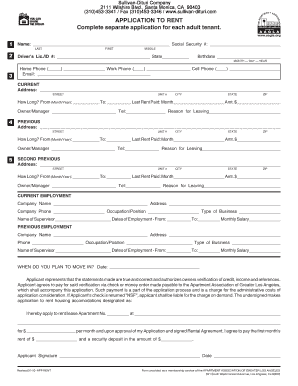
The Sullivan-Dituri Company Application To Rent is a vital document for anyone looking to secure a rental property with the Sullivan-Dituri Company. This guide will provide you with comprehensive, step-by-step instructions to help you complete the application accurately and efficiently online.
Follow the steps to fill out the application form with ease.
- Press the ‘Get Form’ button to acquire the document and open it in your chosen online editor.
- Begin by entering your name in the designated fields, including your last, first, and middle names. Ensure that the information is as it appears on your legal identification.
- Input your social security number, driver's license or identification number, and the state of issue.
- Fill in your birthdate, home phone number, work phone, and cell phone to provide contact information.
- Provide your current address, including street, unit number, city, state, and zip code. Indicate how long you have lived there and the details of your last rent paid.
- For your previous addresses, list them in the respective fields. Include how long you resided at each location, the amount of rent paid, and the reason for leaving.
- Detail your current employment by providing your company name, address, company phone, occupation, and type of business. Input your supervisor's name and employment dates, along with your monthly salary.
- Repeat the previous step for any previous employment, ensuring that all provided information is accurate.
- State your planned move-in date clearly in the provided field.
- Review the disclosure section and confirm the accuracy of the statements before signing and dating the application.
- If applicable, list additional adults or children who will occupy the unit, including their ages and relationships.
- Complete the additional information section, responding to the questions truthfully.
- Fill out your banking information, making sure to include the names of your banks, account numbers, and approximate balances.
- Provide information for credit references, including company names, addresses, account numbers, and balances.
- Complete the emergency contact section with relevant details.
- Declare information about your vehicles if applicable.
- Once all sections are completed, save your changes, download the application, print it, or share it as needed.
Complete your application online today for a smoother renting experience.