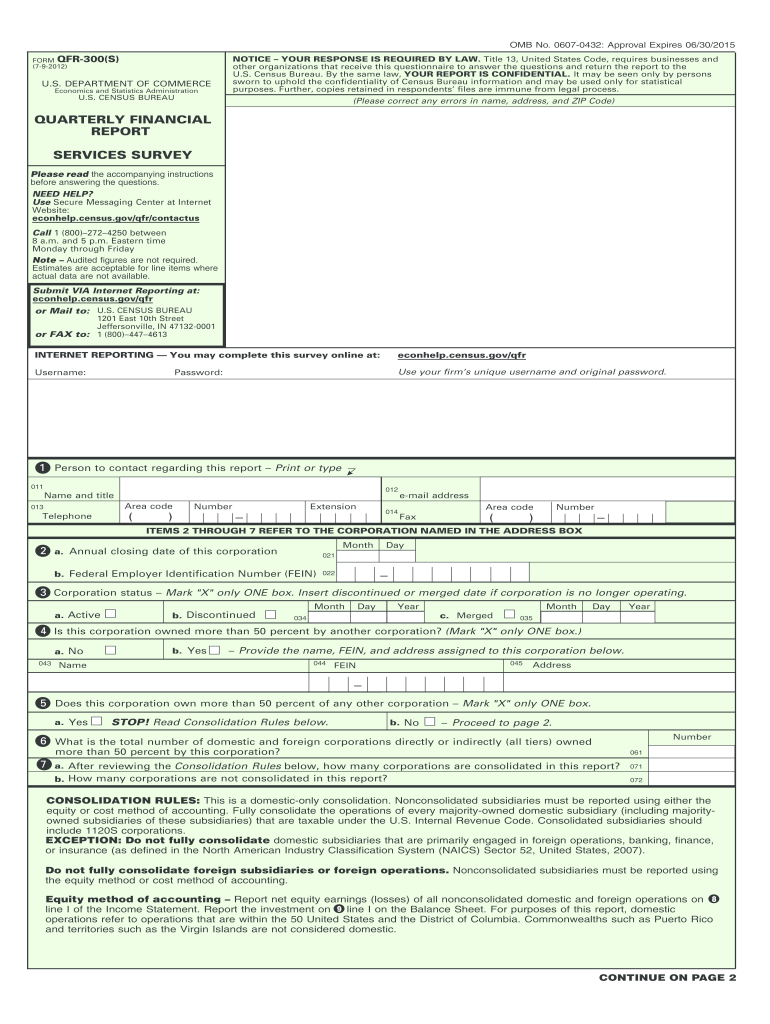
) that are taxable under the U.S. Internal Revenue Code. Consolidated subsidiaries should include 1120S corporations. EXCEPTION: Do not fully consolidate domestic subsidiaries that are primarily engaged in foreign operations, banking, finance, or insurance (as defined in the North American Industry Classification System (NAICS) Sector 52, United States, 2007). Do not fully consolidate foreign subsidiaries or foreign operations. Nonconsolidated subsidiaries must be reported using the equity metho.
Loading

Open form follow the instructions

Easily sign the form with your finger

Send filled & signed form or save
How to fill out the Census QFR-300(S) online
The Census QFR-300(S) is a vital tool for businesses to report their financial data to the U.S. Census Bureau. This guide provides a straightforward and comprehensive approach to completing the form online, ensuring accuracy and compliance with the requirements.
Follow the steps to expertly complete the Census QFR-300(S) online.
- Click the ‘Get Form’ button to access the Census QFR-300(S). This will initiate the download of the form for online completion.
- Input your unique username and password into the designated fields. Ensure that the credentials are correct to gain access to the form.
- Review the form for any pre-filled information, such as the name, address, and ZIP code. Correct any inaccuracies before proceeding.
- Fill out the contact information fields for the person responsible for the report, including their name, title, and contact details.
- Address items 2 through 7, which pertain to the corporation named in the address box. Be meticulous in reporting the corporation’s status and ownership details.
- Complete Schedule A, detailing the statement of income and retained earnings for the specified three-month period. Report all dollar figures in thousands.
- Proceed to Schedule B1, which includes the balance sheet—assets. Carefully report figures pertaining to various asset categories.
- Next, fill out Schedule B2, which outlines the balance sheet liabilities and stockholders’ equity. Make sure all entries reflect accurate figures.
- Double-check the entire form for any errors or omissions before final submission. If needed, seek assistance through the Secure Messaging Center.
- Once completed, save your changes. You can either download the filled form, print it for your records, or share it as required.
Complete the Census QFR-300(S) online today to fulfill your reporting obligations efficiently.
Experience a faster way to fill out and sign forms on the web. Access the most extensive library of templates available.
Related content
Jun 18, 2025 — Instructions for Form QFR-201(MG) [PDF](133Kb). QFR-300(S):. Form...
Jul 10, 2025 — The US Census Bureau's economic indicator surveys provide monthly and...
Get answers to your most pressing questions about US Legal Forms API.
How to legally refuse to participate in the census survey?
Legally refusing to participate in the Census QFR-300(S) can be complex, as participation is required by law. If you have concerns, consider discussing them with a legal expert or using resources from uslegalforms to understand your rights. Knowing your options can empower you to make an informed decision regarding your participation.
What happens if you don't answer census questions?
Failing to answer questions on the Census QFR-300(S) can lead to an inaccurate count, which might affect community resources and representation. While you may not face immediate penalties, your lack of response may contribute to broader issues impacting your community. Engaging with the census is vital for everyone’s benefit.
What if I don't want to answer a question on the census?
If you find a question on the Census QFR-300(S) intrusive or uncomfortable, you may skip it if it is marked as optional. However, you cannot refuse to answer mandatory questions without potential legal repercussions. You can always choose to contact uslegalforms for guidance on how to handle your responses.
Are you legally required to answer all census questions?
Yes, participation in the Census QFR-300(S) is mandated by law, and you are required to answer most questions. However, there are some questions that you may legally decline to answer if they make you uncomfortable or invade your privacy. It's crucial to familiarize yourself with which questions are mandatory and which are optional.
Can you get in trouble for not responding to a census?
Yes, you can face consequences for failing to respond to the Census QFR-300(S). While it is important to participate to ensure accurate representation and funding, the law does impose penalties for non-compliance. Understanding your rights and obligations can help you navigate this requirement effectively.
Can I fill out my census form online?
Yes, you can fill out your Census QFR-300(S) form online. This option allows for a straightforward and quick completion process, which you can access from any device with internet capabilities. The online format not only saves time but also provides instant feedback and confirmation of your submission. Engaging with your census form online is both easy and efficient.
How do I report to the census?
To report to the Census QFR-300(S), you can either complete the survey online or submit a paper form if you receive one by mail. When using the online option, simply visit the official census website and follow the prompts to fill out the necessary information. For any issues or concerns, you can reach out to customer service for guidance and support, ensuring your participation is seamless.
Can I complete the census online?
Absolutely, you can complete the Census QFR-300(S) online. The online system is designed for simplicity and efficiency, allowing you to fill it out at your own pace. By choosing the online option, you benefit from immediate submission and acknowledgment of your responses. This convenient method enhances participation and ensures timely data collection.
What happens if you don't fill out a US census survey?
If you do not fill out the Census QFR-300(S), it can lead to an inaccurate count of the population. This may affect funding for community resources and representation in government. Additionally, the Census Bureau may follow up with you to ensure compliance, which could involve additional surveys or visits. It is crucial to participate and provide accurate data.
Is it safe to fill out the census online?
Filling out the Census QFR-300(S) online is safe and secure. The census uses advanced encryption methods to protect your personal information. Your data is confidential and only used for statistical purposes. Therefore, you can confidently complete the survey online without worrying about your information being compromised.
Use professional pre-built templates to fill in and sign documents online faster. Get access to thousands of forms.
If you believe that this page should be taken down, please follow our DMCA take down process here.
This form is available in several versions. Select the version you need from the drop-down list below.