Loading
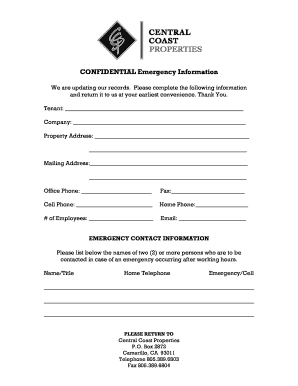
Get Central Coast Properties Confidential Emergency Information
How it works
-

Open form follow the instructions
-

Easily sign the form with your finger
-

Send filled & signed form or save
How to fill out the Central Coast Properties Confidential Emergency Information online
Filling out the Central Coast Properties Confidential Emergency Information form is essential for ensuring that your emergency contact details are up to date. This guide will provide clear and supportive instructions for completing the form accurately and effectively.
Follow the steps to complete your emergency information form.
- Press the ‘Get Form’ button to obtain the form and open it in your preferred online editor.
- Begin by entering your name in the 'Tenant' field. This identifies you as the individual or party submitting the form.
- In the 'Company' section, input the name of your business or organization, if applicable.
- Provide the 'Property Address' where you are located. Include complete details such as street address, city, state, and zip code.
- Next, fill out the 'Mailing Address' field if different from the property address. Ensure all necessary information is included.
- Enter your 'Office Phone' number in the designated field. This number will be used for contact during business hours.
- Complete the 'Fax' field if applicable. If you do not have a fax number, you may leave it blank.
- Provide your 'Cell Phone' number, which will be crucial for immediate contact, particularly in emergencies.
- Fill in your 'Home Phone' number, if you wish to provide an additional contact method.
- Indicate the total number of employees in the 'Number of Employees' field.
- Finally, enter your 'Email' address to facilitate quick communication. Ensure it is accurate.
- In the 'Emergency Contact Information' section, list the names and titles of at least two emergency contacts. For each contact, provide their home telephone number and cell/emergency number.
- Once all information has been accurately completed, review your entries for any errors.
- After ensuring all details are correct, you can save your changes, download the completed form, print it, or share it as needed.
Complete your Central Coast Properties Confidential Emergency Information form online today to ensure your safety and preparedness.