Loading
Get Ca Rcoe 4714t 2018-2026
How it works
-

Open form follow the instructions
-

Easily sign the form with your finger
-

Send filled & signed form or save
How to fill out the CA RCOE 4714T online
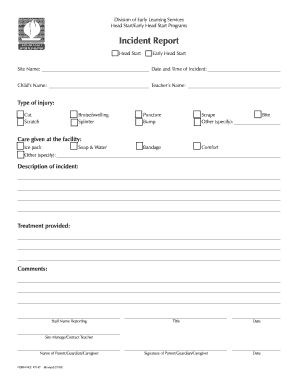
The CA RCOE 4714T form is used for reporting incidents related to children's injuries within Head Start and Early Head Start programs. This guide will help you navigate the process of completing this form online with clear, step-by-step instructions.
Follow the steps to complete the CA RCOE 4714T form online
- Click the ‘Get Form’ button to obtain the form and open it in your preferred online editor.
- Identify the program type by checking the appropriate box for either 'Head Start' or 'Early Head Start' at the top of the form.
- Fill in the 'Site Name' where the incident occurred, and specify the 'Date and Time of Incident' to ensure accurate reporting.
- Enter the child’s name directly to identify the individual involved in the incident.
- Provide the name of the teacher present during the incident to establish accountability.
- Select the type of injury by checking the relevant box from the provided list, including options such as 'Cut', 'Scratch', 'Bruise/swelling', and more.
- Describe the care given at the facility by selecting any appropriate boxes, such as 'Bandage', 'Ice pack', or 'Soap & Water', and provide additional details if necessary.
- In the 'Description of incident' field, write a detailed account of the incident to provide context for the report.
- Document the 'Treatment provided' by noting any specific care actions taken following the incident.
- Include any additional comments relevant to the incident, ensuring all information is clear.
- Complete the ‘Staff Name Reporting’ section to designate the individual responsible for the report. Also, fill in their title and date.
- Have the Site Manager or Contact Teacher sign the form for final approval.
- Enter the name of the parent, guardian, or caregiver along with their signature and date to authenticate the incident report.
- Once all sections are complete, save your changes, and you can download, print, or share the form as needed.
Complete your incident report online now to ensure accurate and timely communication!
Related links form
The mission of the Riverside County Office of Education (RCOE) is to ensure the success of all students through extraordinary service, support, and partnerships. At RCOE, our goal is for every employee in our organization to be diligently engaged in efforts to ensure the success of all students in the county.